
Category: Business Tools → CRM Tools
- The Best CRM Tools for Small Businesses in 2026 — Honest Comparison
- What Makes a Great CRM Tool for Small Businesses?
- Best CRM Tools for Small Businesses — Quick Comparison
- 2. Zoho CRM — Best CRM Tool for Customization and Growing Teams
- 3. Brevo CRM — Best Free CRM Tool Combined with Email Marketing
- 4. Pipedrive — Best CRM Tool for Sales-Focused Small Businesses
- 5. Freshsales — Best CRM Tool with Built-in AI and Communication
- 6. Monday Sales CRM — Best CRM Tool for Visual, Project-Driven Teams
- 7. Less Annoying CRM — Best Simple CRM Tool for Solopreneurs
- CRM Pricing Comparison for Small Businesses — 2026
- Which CRM Tool is Right for Your Small Business?
- Using CRM Tools Alongside Email Marketing Tools for Small Businesses
The Best CRM Tools for Small Businesses in 2026 — Honest Comparison
Finding the best CRM tools for small businesses in 2026 has never been more confusing — and never more important. The CRM market is now worth over $80 billion, and every platform promises to be the one tool that will transform your sales process, automate your follow-ups, and help you close more deals. Most of them can’t deliver on all three — especially not for small businesses working with lean teams and tight budgets.
We’ve tested and compared 7 of the top CRM platforms available right now — looking specifically at what small businesses actually need: ease of setup, free plan quality, pricing transparency, and whether the tool actually gets used after the first week. No enterprise fluff. Just honest, practical recommendations.
If you’re also looking for email marketing tools that work alongside your CRM, we’ve covered the best email marketing tools for small businesses in 2026 — including tools like Brevo that combine email + CRM in a single platform.
What Makes a Great CRM Tool for Small Businesses?
Not all CRMs are built for small businesses. Most enterprise CRMs like Salesforce are powerful but require dedicated admins, long onboarding periods, and budgets that most small teams simply don’t have. The best CRM tools for small businesses have a very different profile — they need to be simple enough for a non-technical founder to set up over a weekend, affordable from day one, and actually useful in daily operations within the first week.
Before comparing specific tools, here’s what to prioritize when choosing a CRM for your small business:
- Ease of adoption — if your team won’t use it daily, it’s not worth paying for
- Free plan quality — generous free tiers let you test before committing
- Pricing transparency — hidden fees and per-user minimums add up fast
- Integration with your existing tools — email, calendar, Slack, Zapier
- Automation on affordable plans — not locked behind expensive tiers
- Mobile app — your team needs CRM access on the go
- Support quality — responsive help when you’re stuck
Best CRM Tools for Small Businesses — Quick Comparison
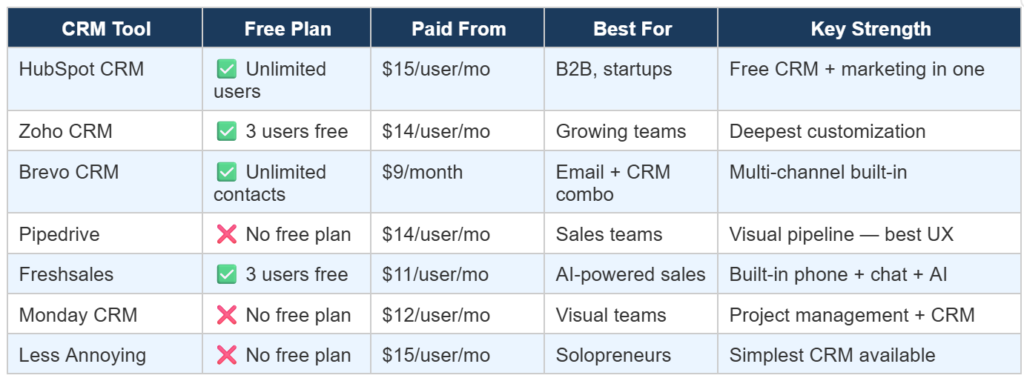
Here’s your at-a-glance comparison before we dive into each tool in detail:
HubSpot is the most recommended free CRM for small businesses — and for good reason. The free plan gives you unlimited users, a complete contact database, pipeline management, email tracking, meeting scheduling, live chat, and a solid reporting dashboard, all at zero cost. For a small business just getting started with CRM, it’s genuinely hard to beat.
What makes HubSpot particularly valuable is how it combines CRM with marketing tools from the same dashboard. You can manage contacts, track deals, send email campaigns, and see which marketing activities are actually driving revenue — all without needing separate tools that you then have to integrate.
The downside: HubSpot gets expensive fast on paid plans. The Starter tier at $15/user/month is reasonable, but the Professional plan at $450/month for 3 users is a significant jump. For small businesses who want to stay on free forever and only pay when absolutely necessary, HubSpot’s free plan is an excellent long-term option.
| ✅ PROS | ❌ CONS |
| ✅ Unlimited users on free plan — no team size cap | ❌ Paid plans get expensive quickly (Professional = $450/mo) |
| ✅ Full sales pipeline + deal tracking for free | ❌ Advanced automation locked behind high-tier plans |
| ✅ Email + CRM + marketing in one platform | ❌ AI features limited on lower plans |
| ✅ Excellent integrations — Gmail, Outlook, Slack | ❌ Can feel overwhelming for simple contact management |
| ✅ Trusted brand — large community + resources | ❌ Free plan reporting is basic |
| ✅ Clean, intuitive UI — quick to learn | ❌ undefined |
| ✅ Scales well as you grow | ❌ undefined |
| ✅ Best for: B2B companies, consultants, service businesses, and startups that want a free CRM with a clear upgrade path. Also perfect if you’re using HubSpot for email marketing already. |
2. Zoho CRM — Best CRM Tool for Customization and Growing Teams
Zoho CRM is the most customizable CRM available at small business pricing. Where most CRMs force you into their predefined workflows, Zoho lets you build custom fields, custom modules, custom automations, and even a custom AI assistant called Zia that predicts which leads are most likely to convert based on your historical data.
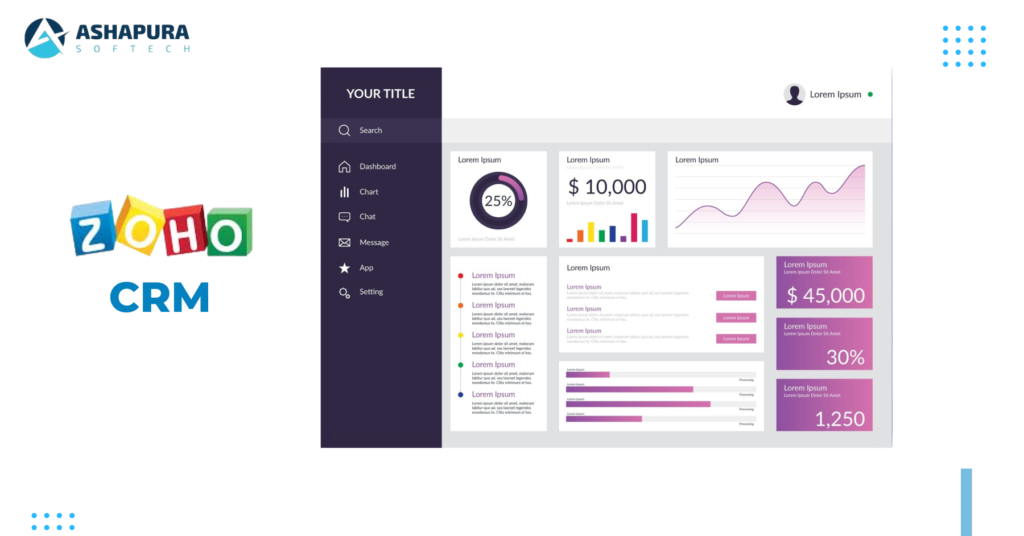
The free plan covers 3 users — which is limiting but still useful for very small teams. Paid plans start at $14/user/month, which is competitive, and include multi-channel communication (email, phone, social media, live chat) from a single dashboard. For businesses with non-standard sales processes that don’t fit cookie-cutter CRM templates, Zoho bends where others break.
The trade-off is complexity. Zoho’s interface is less polished than HubSpot’s, and the workflow builder has a steeper learning curve. But for teams willing to invest a few days in setup, the depth of customization available at this price point is unmatched.
| ✅ PROS | ❌ CONS |
| ✅ Deepest customization of any small business CRM | ❌ Steeper learning curve than HubSpot or Pipedrive |
| ✅ Zia AI available on standard plans — not just enterprise | ❌ Interface feels older and less polished |
| ✅ Multi-channel: email, phone, social, chat in one place | ❌ Free plan limited to 3 users only |
| ✅ Free for 3 users forever | ❌ Customer support can be slow on lower plans |
| ✅ $14/user/month — genuinely affordable paid tier | ❌ Some features require higher plans than expected |
| ✅ Part of Zoho’s 45+ app ecosystem | ❌ Setup time is significant for complex workflows |
| ✅ Strong workflow automation on mid-tier plans | ❌ undefined |
| ✅ Best for: Small businesses with specific, non-standard sales processes that need heavy customization. Also great if you already use other Zoho apps (Zoho Books, Zoho Projects, Zoho Campaigns). |
3. Brevo CRM — Best Free CRM Tool Combined with Email Marketing
Brevo is unique on this list because it’s primarily known as an email marketing platform that also includes a built-in CRM — not the other way around. If your small business sends email campaigns regularly and also needs contact management and deal tracking, Brevo lets you do both from a single platform without paying for two separate tools.
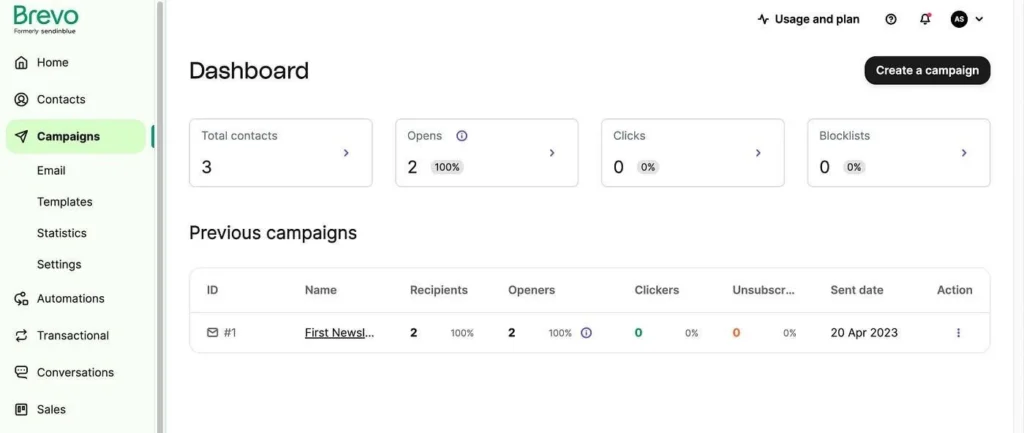
The free plan includes unlimited contact storage, basic deal tracking, pipeline management (up to 50 open deals), and email marketing (300 emails/day). For a small business managing both email campaigns and a sales pipeline simultaneously, this combination is genuinely rare at no cost.
We’ve written a detailed Brevo review 2026 covering its free plan limits, email deliverability, pricing, and full pros/cons — worth reading before you decide if Brevo fits your workflow.
| ✅ PROS | ❌ CONS |
| ✅ Email marketing + CRM in one platform — no integrations needed | ❌ CRM features less deep than dedicated CRM tools |
| ✅ Unlimited contacts on free plan | ❌ 50 open deals limit on free plan |
| ✅ 300 emails/day free forever — no time limit | ❌ 300 emails/day cap can slow large campaigns |
| ✅ Built-in SMS and WhatsApp marketing | ❌ Advanced automation requires Standard ($18/mo) |
| ✅ $9/month Starter — most affordable upgrade | ❌ Single user only on free and Starter plans |
| ✅ EU-based servers — GDPR compliant | ❌ Not ideal if you need complex pipeline stages |
| ✅ Multi-channel sales + marketing tracking | ❌ Phone support only on Professional+ |
| ✅ Best for: Small businesses that run email marketing campaigns AND need basic CRM — and don’t want to pay for two separate tools. Especially good for eCommerce and service businesses. |
4. Pipedrive — Best CRM Tool for Sales-Focused Small Businesses
Pipedrive was built by salespeople for salespeople — and it shows. The entire platform is organized around one core idea: helping your team close deals. The visual drag-and-drop pipeline is the clearest, most intuitive deal management interface available in any CRM at this price point. You can see every deal’s stage at a glance, drag deals between stages, and immediately spot which deals are stalled or at risk.
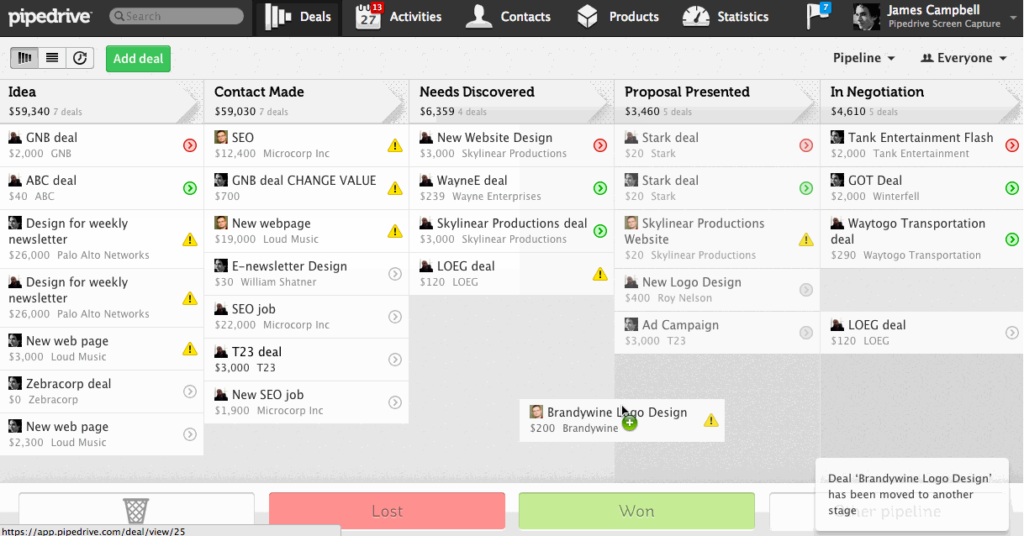
There’s no free plan, but the Essential plan at $14/user/month includes unlimited contacts, a visual pipeline, email integration, activity tracking, and basic reporting. For small sales teams who need simplicity and clarity over feature depth, Pipedrive consistently ranks as the easiest CRM to actually use and maintain long-term.
| ✅ PROS | ❌ CONS |
| ✅ Clearest, most visual pipeline of any CRM tool | ❌ No free plan — must pay from day one |
| ✅ Easy to learn — most teams productive in 1 day | ❌ Not an all-in-one tool — needs integrations for email marketing |
| ✅ Unlimited contacts on all paid plans | ❌ Advanced AI features require higher plans ($49/user/mo) |
| ✅ Strong email + calendar integrations | ❌ Limited marketing features compared to HubSpot/Brevo |
| ✅ Focused tool — does sales CRM exceptionally well | ❌ Customer support average on lower tiers |
| ✅ Good mobile app for on-the-go deal management | ❌ Reporting basic on Essential plan |
| ✅ Affordable at $14/user/month entry | ❌ Not ideal for complex, non-linear sales processes |
| ✅ Best for: Sales-driven small businesses and B2B teams who need a clean, visual pipeline and fast adoption. If your team’s primary job is closing deals, Pipedrive is purpose-built for them. |
5. Freshsales — Best CRM Tool with Built-in AI and Communication
Freshsales stands out because it’s the only CRM on this list that includes a built-in phone system, live chat, and AI lead scoring all in one platform — even on mid-tier plans. For small businesses that do a lot of calling, Freshsales eliminates the need for a separate phone tool like Aircall or Dialpad, which can save $30–$50/user/month on its own.
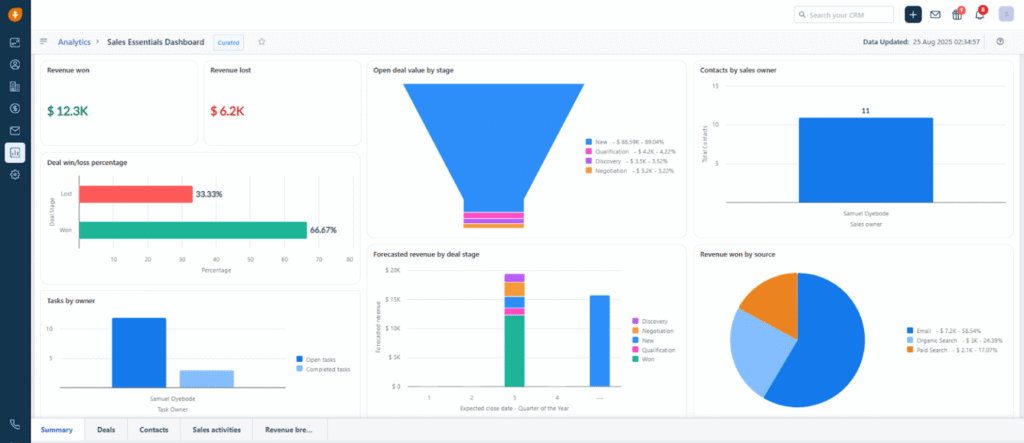
The AI assistant (Freddy AI) scores leads automatically based on engagement, predicts which deals are most likely to close, and surfaces next-best-action recommendations — features that typically only appear in enterprise CRM tools. On Freshsales Growth plan ($11/user/month), this level of AI is genuinely impressive at the price.
| ✅ PROS | ❌ CONS |
| ✅ Built-in phone, chat, and email — all in one tool | ❌ Free tier quite limited after trial period |
| ✅ Freddy AI lead scoring on mid-tier plans ($11/user/mo) | ❌ Advanced AI requires Growth plan or higher |
| ✅ Free plan for 3 users (21-day trial then free tier) | ❌ Some features feel less polished than HubSpot |
| ✅ Clean, modern interface — easy to adopt | ❌ Integrations fewer than Pipedrive or HubSpot |
| ✅ Strong automation on affordable plans | ❌ Reporting needs improvement on lower tiers |
| ✅ Good mobile app with calling capability | ❌ Not ideal for complex B2B enterprise sales |
| ✅ Excellent for teams that do outbound calling | ❌ Support response times inconsistent |
| ✅ Best for: Small businesses that do significant phone outreach and want AI insights without paying enterprise prices. Also good for teams replacing multiple tools (phone + chat + CRM) with one platform. |
6. Monday Sales CRM — Best CRM Tool for Visual, Project-Driven Teams
Monday Sales CRM is the natural choice for teams that already use Monday.com for project management. It brings the same visual, board-based interface to CRM — giving you a highly customizable view of contacts, deals, and pipelines that feels more like a spreadsheet than a traditional CRM. For teams who find standard CRM interfaces too rigid, Monday’s flexibility is genuinely refreshing.
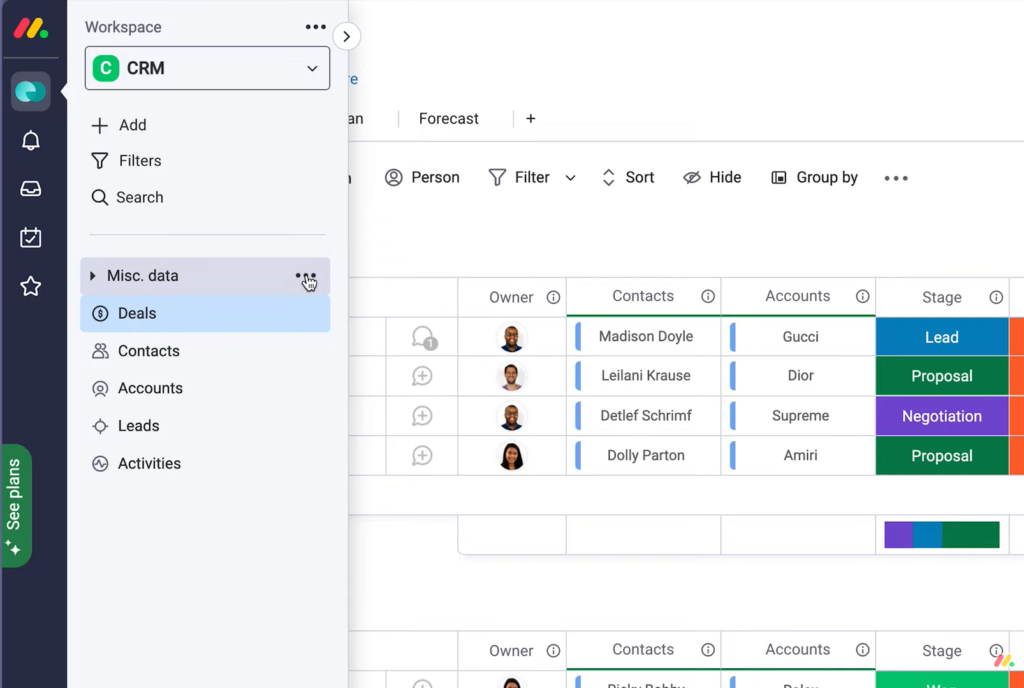
Pricing starts at $12/user/month but requires a minimum of 3 seats ($36/month minimum). There’s no free CRM plan, though Monday.com has a free project management tier that doesn’t include the CRM features. For teams that need both project management and basic CRM in one tool, the combination can be cost-effective compared to running both separately.
If you’re evaluating Monday CRM because of its project management integration, also check out our guide to the best project management tools for small businesses in 2026 — which covers monday.com, ClickUp, Asana, Notion, and more in full detail.
| ✅ Best for: Teams already using Monday.com who want to add CRM without switching platforms. Also good for visual thinkers who prefer board-based interfaces over traditional list or pipeline views. |
7. Less Annoying CRM — Best Simple CRM Tool for Solopreneurs
Less Annoying CRM does exactly what the name promises: it’s the simplest CRM available, with no tiers, no feature gates, and no confusing pricing. One flat rate of $15/user/month gives you everything — unlimited contacts, pipeline management, email logging, calendar integration, and mobile access. No upsells. No ‘that feature is only on the Professional plan.’
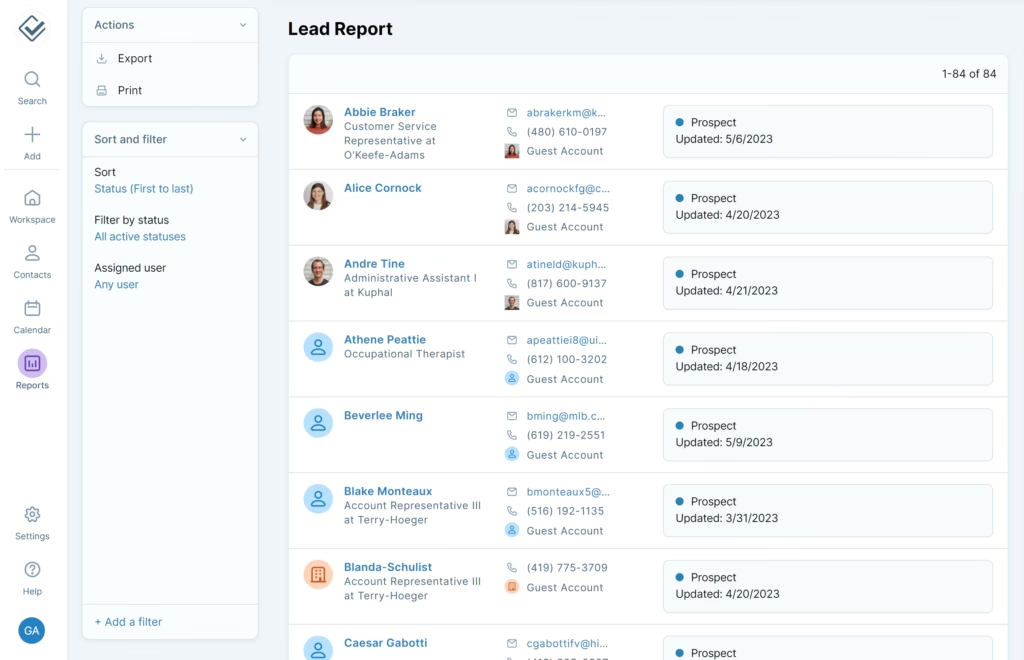
The interface is deliberately minimal. There are no AI features, no advanced automation, no built-in phone system. What you get is a clean, fast tool for managing contacts and following up with leads — nothing more. For a solo business owner or a very small team that just needs a better system than a spreadsheet, Less Annoying CRM is often the perfect starting point.
| ✅ PROS | ❌ CONS |
| ✅ Simplest CRM interface available — zero learning curve | ❌ No free plan after trial |
| ✅ $15/user/month flat — everything included, no upsells | ❌ No AI features or advanced automation |
| ✅ No minimum seats — pay for exactly what you need | ❌ No built-in email marketing or phone system |
| ✅ Free 30-day trial — no credit card required | ❌ Limited integrations compared to HubSpot or Zoho |
| ✅ Excellent US-based customer support | ❌ Reporting very basic — not suitable for data-driven teams |
| ✅ Mobile-friendly interface | ❌ Will outgrow it if you scale beyond 10 people |
| ✅ Perfect for solopreneurs and 1-3 person teams | ❌ Not for complex sales processes or large teams |
| ✅ Best for: Solopreneurs, freelancers, and very small teams (1-3 people) who need a simple contact manager and follow-up tracker without any complexity or feature overload. |
CRM Pricing Comparison for Small Businesses — 2026
Here’s exactly what you’ll pay at each tier, and what those paid plans actually unlock:
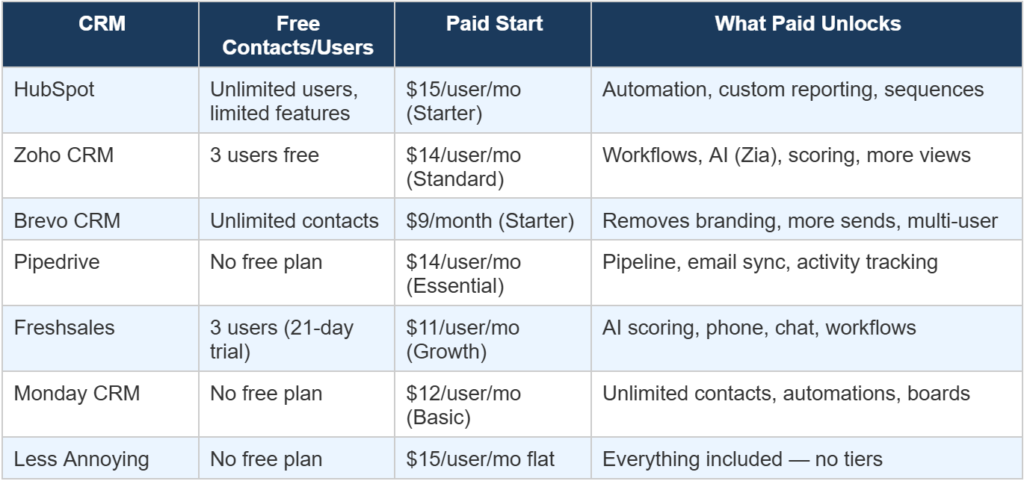
| 💡 Key insight: The biggest pricing trap in CRM is per-seat minimums. Asana, Monday, and some HubSpot plans require minimum 2-3 seats even if you’re a solo user. Always check the minimum spend before signing up — not just the per-user price. |
Which CRM Tool is Right for Your Small Business?
There’s no single best CRM for every small business — the right choice depends entirely on how you sell, what tools you already use, and how technical your team is. Here’s a quick decision guide:
- You want the best free CRM forever → HubSpot Free. Unlimited users, zero cost, solid foundation.
- You need heavy customization at low cost → Zoho CRM. Most flexible tool at small business pricing.
- You want email marketing + CRM in one tool → Brevo. Best combination platform for the price.
- Your team’s job is closing sales → Pipedrive. Clearest pipeline, fastest adoption.
- You do a lot of phone outreach → Freshsales. Built-in calling + AI at $11/user/month.
- You already use Monday.com → Monday Sales CRM. Keep everything in one board-based workspace.
- You’re a solopreneur who just needs simplicity → Less Annoying CRM. $15/month, no decisions needed.
Using CRM Tools Alongside Email Marketing Tools for Small Businesses
One of the most common questions small businesses ask is whether they need a CRM and an email marketing tool, or whether one platform can do both. The honest answer is: it depends on your volume and complexity.
For businesses sending regular email campaigns to large lists (1,000+ subscribers), a dedicated email marketing tool will always deliver better deliverability, better template builders, and better campaign analytics than a CRM’s built-in email features. CRM email is built for 1-to-1 sales emails — not broadcast campaigns.
The sweet spot for most small businesses is a simple CRM paired with a focused email marketing tool. HubSpot CRM + MailerLite, for example, gives you the best free CRM available combined with the best free email marketing plan available — without paying for either.
If you’re pairing a CRM with an email marketing tool, our MailerLite vs Mailchimp for beginners comparison breaks down which email platform gives you more value — especially on free plans.
FAQs — Best CRM Tools for Small Businesses
Final Verdict: Best CRM Tools for Small Businesses in 2026
The best CRM tools for small businesses in 2026 are better — and more affordable — than they’ve ever been. Free plans from HubSpot and Zoho give small teams a genuine foundation to start with. Brevo bridges the gap between email marketing and CRM for businesses that need both. And purpose-built tools like Pipedrive and Less Annoying CRM serve specific needs exceptionally well.
Our overall recommendation for most small businesses: start with HubSpot Free. It gives you the most functionality at zero cost, scales when you’re ready, and integrates with virtually every other tool you’ll ever need. If you outgrow it — or if you need customization HubSpot doesn’t offer — Zoho CRM is the best next step.
Whatever you choose, the important thing is to start using a CRM before your contact list gets too large to manage manually. The sooner your sales process has structure, the easier it becomes to scale
| Building your complete business tool stack? After choosing a CRM, the next decision for most small businesses is project management. Check out our guide to the best project management tools for small businesses — covering ClickUp, Asana, monday.com, Notion, Trello, and more. |
Written by Aqib Khushk | Tool Growth | toolgrowth.com | March 2026
Category: Business Tools → CRM Tools | Tags: CRM, HubSpot, Zoho, Brevo, Pipedrive, Small Business


Pingback: monday.com Review 2026: Is It Worth It? -
Pingback: Best Productivity Tools for Small Businesses in 2026 -