
Category: Business Tools → Project Management | Rating: 4.2 / 5
Choosing a project management tool in 2026 is harder than ever. With dozens of options available, monday.com is often marketed as the most visual and powerful platform — but does it actually justify its price?
Find the Right SaaS Tools to Grow Your Business
QUICK VERDICT
I’ve spent the past 6 months testing monday.com with my team to see if this popular platform is really worth it in 2026 or just hype. In this monday.com review, I’ll share things that often get overlooked in marketing ads. Of course, it’s the most powerful tool in terms of visuals, with 15+ views and a great automation builder, but one thing really bothered me: its ‘3-seat minimum’ rule. If you’re a solo user like me or running a team of 2 people, you have to pay for the seats you’re not even using. In my experience, this tool is excellent for teams of 5+ people, but for smaller teams, ClickUp or Asana offer much better value.
| I Tested the Standard Plan for This Review |
monday.com Review 2026 — The Full Honest Breakdown
This monday.com review covers everything small businesses and growing teams need to know before signing up in 2026: pricing (including the hidden 3-seat minimum), free plan limits, key features, and whether monday.com is actually worth its cost compared to cheaper alternatives like ClickUp and Asana. After extensive hands-on testing, our conclusion is nuanced — monday.com is excellent software with a pricing model that doesn’t suit every team size.
monday.com launched in 2014 as a visual work management platform and has grown into one of the most-used project management tools worldwide, now serving over 225,000 companies. What makes it distinct is its board-based system — every project, team, and workflow lives on a customizable board that can be viewed as a table, Kanban, Gantt chart, calendar, timeline, map, chart, or workload view. This flexibility is genuinely impressive and difficult to match at this price point.
We’ve also covered monday.com in our full guide to the best project management tools for small businesses in 2026 — which compares it directly against ClickUp, Asana, Trello, Notion, and more
monday.com Review — Ratings at a Glance
Here’s how monday.com scores across every key category after hands-on testing in 2026:
| Category | Rating | Score |
| Ease of Use | ★★★★☆ | 4.3 / 5 |
| Free Plan Value | ★★★☆☆ | 3.0 / 5 |
| Features & Views | ★★★★★ | 4.8 / 5 |
| Automation | ★★★★☆ | 4.2 / 5 |
| Integrations | ★★★★★ | 4.7 / 5 |
| Pricing Fairness | ★★★☆☆ | 3.2 / 5 |
| Customer Support | ★★★★☆ | 4.0 / 5 |
| OVERALL | ★★★★☆ | 4.2 / 5 |
monday.com Pros and Cons — Honest Review for 2026
| ✅ PROS | ❌ CONS |
| ✅ 15+ project views — Table, Kanban, Gantt, Calendar, Timeline, Map, Workload and more | ❌ 3-seat minimum on ALL paid plans — solo users pay for 3 seats they don’t need |
| ✅ Most visually customizable PM tool at this price point | ❌ Free plan very limited — only 3 boards, no automation, no integrations |
| ✅ 200+ pre-built templates for every industry and use case | ❌ Time tracking locked behind Pro plan ($19/user/mo) — not available on Standard |
| ✅ Plain-language automation builder — easiest to configure of any PM tool | ❌ Automation limits on Standard plan (250 actions/user/mo) — easy to exceed |
| ✅ Excellent integrations — 200+ native connections (Slack, Gmail, Zoom, Salesforce) | ❌ Can feel overwhelming to set up for non-technical users |
| ✅ AI assistant on all plans — summarize updates, generate tasks, auto-categorize | ❌ Pricier than ClickUp for equivalent features (ClickUp starts at $7/user/mo) |
| ✅ Free plan available (2 users) — good for testing | ❌ Mobile app lacks full desktop functionality for complex board editing |
| ✅ Scales from small team to enterprise without switching platforms | ❌ Advanced reporting requires higher tiers |
| ✅ Monday Work Docs — collaborative documents inside boards | ❌ No built-in chat — relies on integrations with Slack/Teams |
| ✅ Strong mobile app — clean and fast for status updates on the go | ❌ Storage overages cost extra ($10 per 10GB) |
monday.com Pricing Review 2026 — What Small Businesses Actually Pay
monday.com’s pricing looks straightforward on the surface — but contains one major catch that catches many small businesses by surprise: there is a 3-seat minimum on ALL paid plans. This means even if you’re a solo user or a 2-person team, you pay for 3 seats. A freelancer wanting the Basic plan pays $27/month minimum — not $9. This makes monday.com significantly less competitive for very small teams
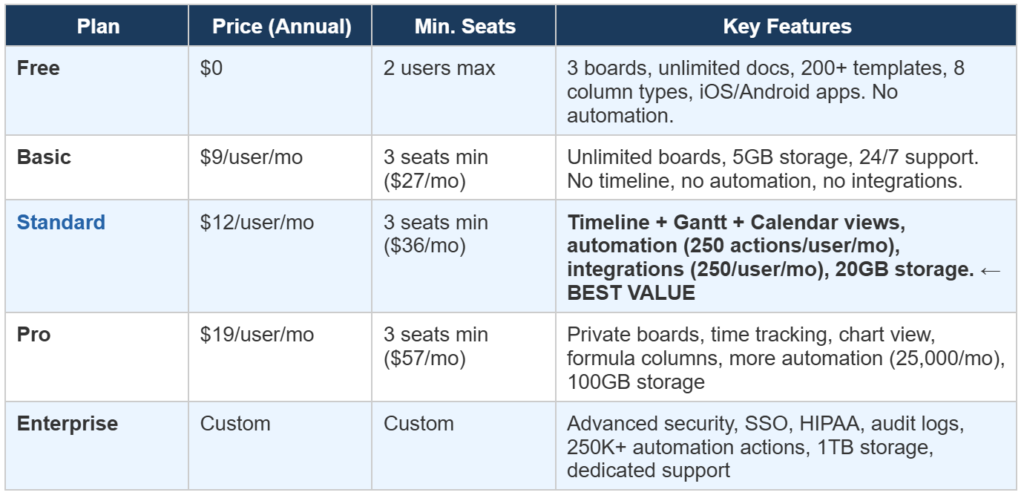
| ⚠️ Important: The 3-seat minimum applies to ALL paid plans — Basic, Standard, Pro, and Enterprise. A 1-person or 2-person team will always pay for 3 seats. At Standard plan that’s $36/month minimum. For solo users, ClickUp ($7/month for 1 user) or Asana ($10.99/month for 1 user) are significantly cheaper. |
Despite the minimum seat issue, the Standard plan at $12/user/month ($36/month minimum for 3 seats) is genuinely the sweet spot for small teams. It unlocks Timeline + Gantt + Calendar views, automation, and integrations — the three features that make monday.com worth paying for over free alternatives. The jump from Basic to Standard is significant and worth paying for immediately.
The Pro plan at $19/user/month adds time tracking, private boards, and advanced formula columns — features that growing teams with billing, client tracking, or confidential projects will eventually need. For teams under 10 people, Standard is usually sufficient to start.
monday.com Free Plan Review — Is It Actually Useful?
The monday.com free plan supports 2 users maximum and 3 boards — which is genuinely very limited. There is no automation, no integrations, and no timeline or Gantt view on the free plan. For a team trying to manage real projects, 3 boards fills up within the first week of use. The free plan is best understood as a trial environment rather than a sustainable working solution.
Compared to ClickUp’s free plan unlimited users, unlimited tasks, 100MB storage, basic automation) and MailerLite’s free plan (which is genuinely functional long-term), monday.com’s free plan is weak. The value of monday.com starts on the Standard paid plan — not the free tier.
| 💡 Honest take: If you need a free project management tool that you can actually use long-term with a small team, ClickUp’s free plan is significantly more generous than monday.com’s. monday.com’s free plan is best used as a 14-day evaluation, not a permanent solution. |
monday.com Key Features Review — What We Tested
Board Views — The Real Strength of monday.com
The board view system is where monday.com genuinely earns its reputation. With 15+ views available, you can visualize any project exactly the way your team thinks about work — not the way the software forces you to. Marketing teams use the Calendar view for content planning. Development teams use the Gantt view for sprint timelines. Operations teams use the Workload view for capacity management. Clients use the Table view for status reports.
Switching between views is instantaneous — every view updates in real-time as data changes, so your Kanban board, Gantt chart, and calendar all reflect the same underlying data without any manual syncing. This is the feature monday.com does better than almost any competitor at this price point.
Automation Builder — Easiest in the Market
monday.com’s automation builder uses plain-language triggers and actions that read like English sentences: ‘When status changes to Done, notify person and move item to archive.’ Unlike ClickUp’s automation system (which is more powerful but harder to configure) or Asana’s (which is limited on lower plans), monday.com’s automation feels natural to set up even for non-technical team members.
The Standard plan includes 250 automation actions per user per month — which sounds generous but can be limiting for active teams. A team of 10 running 5 automations that each trigger daily will use 1,500 actions per month (10 users × 5 automations × 30 days) — well within Standard limits. But add more automations and that ceiling approaches quickly. The Pro plan at $19/user/month raises this to 25,000 actions per month for teams with heavy automation needs.
Integrations — 200+ Connections
monday.com connects natively with over 200 tools — including Slack, Microsoft Teams, Google Workspace, Zoom, Salesforce, HubSpot, GitHub, Jira, and Zapier. Most integrations work through a similar trigger-action system as the automation builder, making them straightforward to configure without technical knowledge.
One important note: integrations are locked behind the Standard plan and above. The Basic plan ($9/user/month, $27/month minimum) has no integrations — meaning you cannot sync monday.com with Slack, Gmail, or any other tool on the Basic tier. For most teams, this makes the Standard plan the effective minimum, not the Basic plan.
AI Features — Genuinely Useful in 2026
monday.com’s AI assistant (added across all plans in 2025) can summarize board updates, generate task descriptions, suggest automation workflows, and categorize items automatically. Unlike some AI features that feel bolted on, monday.com’s AI integrates directly into the board workflow — you can ask it to summarize ‘what happened on this project last week’ or ‘what tasks are overdue’ and get contextual answers from your actual board data.
AI credits are included on all plans, with higher tiers getting more credits. For small teams, the AI quota on Standard and Pro plans is more than sufficient for regular use.
monday.com Review vs ClickUp vs Asana — Which PM Tool Wins?
The most common monday.com review question is how it compares to its two main competitors for small businesses — ClickUp and Asana. Here’s the honest side-by-side:
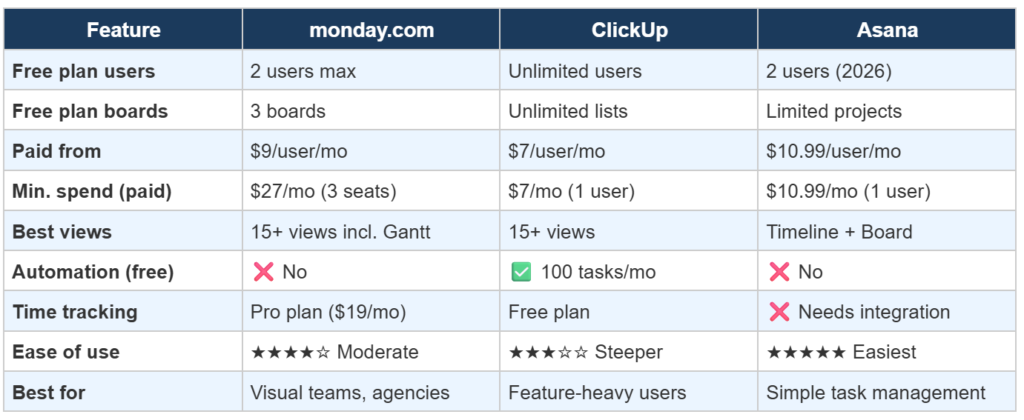
We’ve written a dedicated comparison of ClickUp vs Asana: Which One Should You Choose? — covering pricing, features, free plans, and which tool wins for different team types. Worth reading before making a final decision on PM tools.
Who Should Use monday.com in 2026? — Our Honest Recommendation
Based on this full monday.com review, here is exactly who should — and should not — choose monday.com:
| ✅ monday.com is the RIGHT choice if you are:• A team of 5 or more people — the 3-seat minimum becomes fair value at 5+ seats• A creative agency, marketing team, or operations department managing complex workflows• A business that needs 15+ views to visualize different aspects of the same project• A team already using monday.com’s ecosystem (Monday CRM, Monday Dev)• A growing business that needs automation + integrations from day one• A team that values visual clarity and ease of onboarding over feature depth |
| ❌ monday.com is NOT the right choice if you are:• A solo user or 2-person team — the 3-seat minimum makes it overpriced• A budget-conscious team — ClickUp offers similar features from $7/user/month• A team that needs time tracking without paying for Pro ($19/user/mo)• A software development team needing sprints and story points (use Jira)• A team that primarily needs document collaboration (use Notion)• A team that wants generous free forever plan (use ClickUp) |
monday.com Review — Frequently Asked Questions
Final Verdict — monday.com Review 2026
In my opinion, after testing nearly every feature of monday.com for six months, my conclusion is simple: I give it a 4.2/5 rating and a conditional recommendation.
It’s undoubtedly one of the best tools visually. When I used its views, automation, and templates, they really looked excellent. My real frustration was the 3-seat minimum rule. I noted that it forces small teams and solo users to an expense they simply don’t need.
My direct and personal advice is this: If your team consists of 5 or more people and you need visual workflows, automation, and strong integrations, monday.com’s Standard plan ($12/user/month) is a strong choice.
But, if you’re a smaller team like me and are budget-conscious, please learn from my mistake: start with ClickUp Free forever Plan or Asana’s Free Personal plans. Only consider upgrading when you reach their limitations
If you’re also looking for CRM tools, you can check my detailed guide on the best CRM tools for small businesses in 2026.
- 2026
- Asana
- Beginner Guide
- Brevo
- Brevo vs Mailchimp
- ClickUp
- Comparison
- Email Marketing
- Email Marketing Basics
- Email Tool Comparison
- Google Workspace
- How to Choose
- Loom
- Mailchimp
- MailerLite
- monday.com
- Notion
- PM Tools Comparison
- Productivity Tools
- Project Management
- Project Management Software
- Remote Teams
- Remote Work Tools
- Slack
- Small Business
- Small Business Marketing
- Small Business Tools
- Team Collaboration
- Zoho Projects
Written by Aqib Khushk | Tool Growth | toolgrowth.com | March 2026
Category: Business Tools → Project Management | Tags: monday.com, Project Management, monday.com Review, Small Business




Pingback: How to Choose Project Management Software in 2026 -