QUICK VERDICT
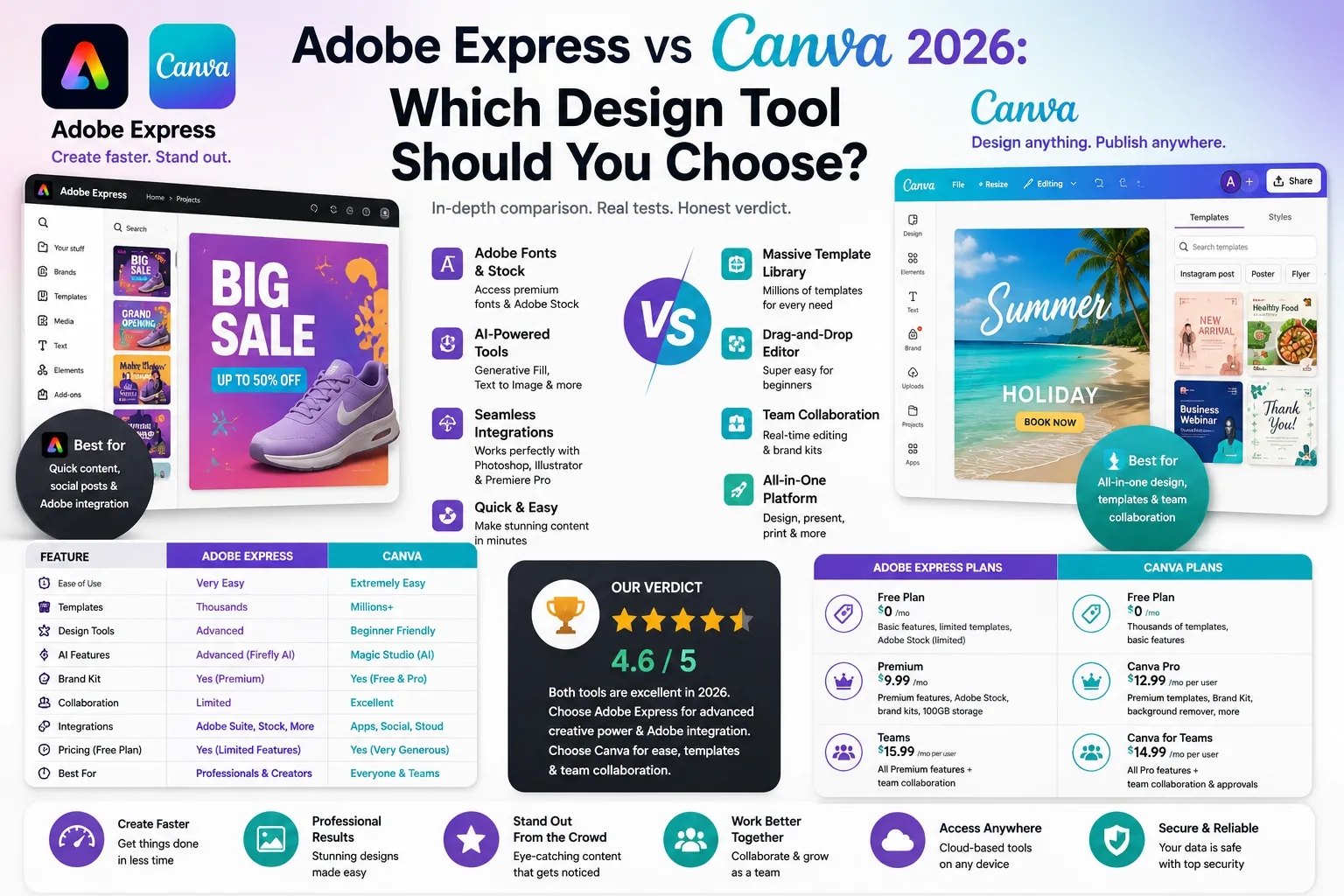
- Best for Beginners: Canva — bigger free plan, 250,000+ templates, easiest drag-and-drop editor.
- Best for Adobe Users: Adobe Express — deep Adobe CC integration, superior AI via Firefly, and stronger video editing tools.
The Pricing Reality: Both tools are free to start. Canva Pro costs $15/month. Adobe Express Premium costs $9.99/month (or free with Creative Cloud). The right choice depends on your workflow, existing tools, and design experience.
Why This Comparison Matters in 2026: Choosing between Adobe Express vs Canva is one of the most common design tool dilemmas in 2026. Canva leads on template variety with 250,000+ designs, while Adobe Express leads on AI capabilities through Adobe Firefly. Both tools have heavily upgraded their features recently. Adobe Express added Firefly AI and Premiere Pro integration, while Canva launched its Magic Studio AI suite. This guide breaks down their free plans, pricing, and features so you can make the right choice.
1. Adobe Express vs Canva — Quick Overview
The Verdict: Canva is the ultimate tool for beginners needing massive template variety, while Adobe Express is the powerhouse for users wanting advanced AI and Adobe integration.
- Canva: Launched in 2013, its entire focus is accessibility. With over 260M users, it dominates the template-first design space. For a complete breakdown, read our full Canva Review 2026 before making your final decision.
- Adobe Express: Built to bring Adobe’s 40-year design heritage to non-designers. It integrates seamlessly with Photoshop and Premiere Pro, making it ideal for creative professionals.
Side-by-Side Comparison Table
| Feature | Adobe Express | Canva |
|---|---|---|
| Founded | 2016 (as Adobe Spark) | 2013 |
| Users | 30M+ users | 170M+ users |
| Free Plan | Yes — generous | Yes — most generous |
| Paid Plan | $9.99/month (Premium) | $15/month (Pro) |
| Templates | 25,000+ | 250,000+ |
| AI Tools | Adobe Firefly (advanced) | Magic Studio (growing) |
| Video Editing | Strong — Premiere integration | Basic to moderate |
| Brand Kit | Yes (Premium) | Yes (Pro) |
| Collaboration | Yes (teams) | Yes (stronger — real-time) |
| Best For | Adobe CC users, video creators | Beginners, small businesses |
2. Adobe Express vs Canva — Free Plan Comparison
The Verdict: Canva wins decisively on template volume, while Adobe Express offers unexpected value with free AI and PDF tools.
Canva Free: The most generous free tier in the industry. It gives you 250,000+ templates, 1 million+ stock assets, and 5GB of storage. Many users never need to upgrade.
Adobe Express Free: More powerful than most realize. While it offers fewer templates (25,000+), it gives you free access to PDF conversion tools, background removal, and Adobe Firefly AI credits—features Canva locks behind its paid plan.
💡 The Catch for Brands: Neither free plan is great for brand consistency. Both platforms lock their Brand Kit (custom fonts, colors, logos) behind their premium subscriptions.
What Do You Get for Free?
| Feature | Adobe Express Free | Canva Free |
|---|---|---|
| Templates | 25,000+ | 250,000+ |
| Stock Photos | Adobe Stock (limited) | 1M+ photos & graphics |
| Storage | 2GB | 5GB |
| AI Image Generation | Firefly credits (limited) | Magic Media credits (limited) |
| Brand Kit | ❌ Premium only | ❌ Pro only |
| Remove Background | ✅ Free | ❌ Pro only |
| PDF Tools | ✅ Free (convert, edit) | ❌ Pro only |
| Video Editing | ✅ Basic | ✅ Basic |
| Collaboration | ✅ (limited users) | ✅ (limited users) |
| Watermarks | ❌ None | ❌ None |
| 💡 Key insight: Canva Free wins on template volume and stock photo access.Adobe Express Free wins on background removal and PDF tools — both availableat zero cost. Therefore, if PDF editing and background removal are priorities,Adobe Express Free delivers more value than its template count suggests. |
3. Adobe Express Premium vs Canva Pro — Pricing
The Verdict: Adobe Express wins on base price ($9.99/mo) and is an absolute steal for Creative Cloud users, but Canva Pro ($15/mo) offers better value for teams needing massive storage and collaboration.
Adobe Express Premium: Costs $9.99/month, making it a cheaper option for solopreneurs. The biggest advantage? It is completely free if you already pay for any Adobe Creative Cloud subscription (like Photoshop or Premiere Pro).
Canva Pro: Costs $15/month. While slightly more expensive, it justifies the extra $5 by giving you 1TB of cloud storage (compared to Adobe’s 100GB), an advanced social media content scheduler, and superior team collaboration features.
Adobe Express Premium vs Canva Pro — Price Table
| Feature | Adobe Express Premium | Canva Pro |
|---|---|---|
| Monthly Price | $9.99/month | $15/month |
| Annual Price | $99.99/year ($8.33/mo) | $120/year ($10/mo) |
| CC Bundle | Free with Creative Cloud | N/A — standalone only |
| Storage | 100GB | 1TB |
| Templates | 25,000+ premium | 610,000+ premium |
| Brand Kit | ✅ Full brand controls | ✅ Full brand controls |
| AI Credits | Generous Firefly credits | Magic Studio credits |
| Team Seats | Add-on pricing | Up to 5 seats (Teams plan) |
| Social Scheduling | Basic | Advanced (Content Planner) |
| Priority Support | ✅ | ✅ |
4. Adobe Express vs Canva — Features Breakdown
Templates: Canva crushes it with 250,000+ free templates and 610,000+ on Pro. Adobe Express offers around 25,000+, but they are consistently higher quality and more professionally polished.
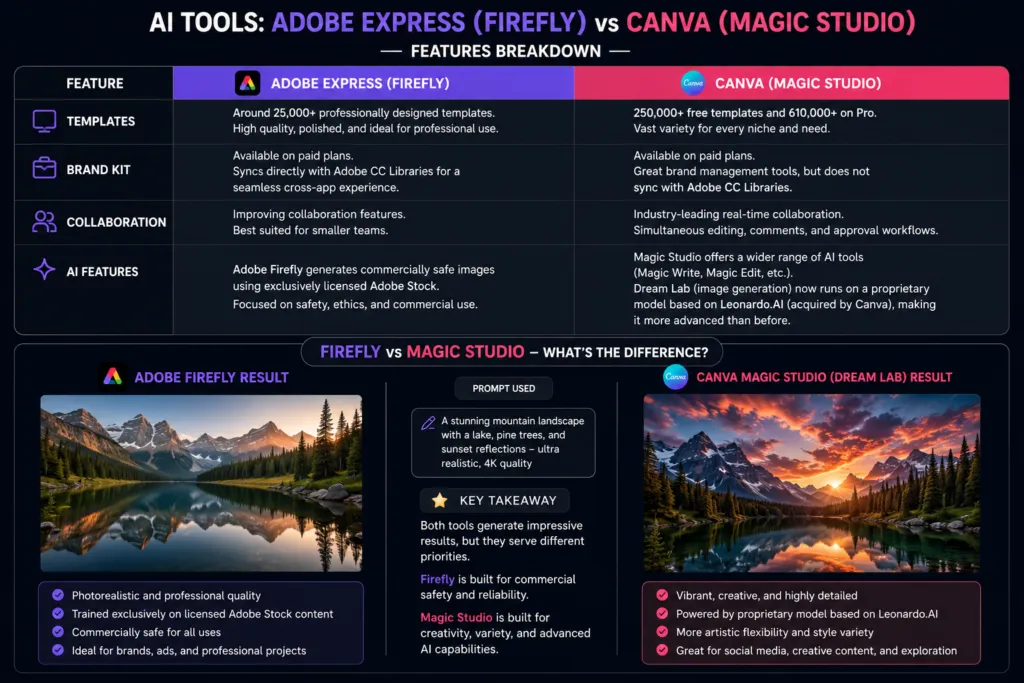
Brand Kit: Both platforms offer this on paid tiers. However, Adobe Express syncs directly with Adobe CC Libraries, giving Creative Cloud users a seamless cross-app experience that Canva cannot replicate.
Collaboration: Canva leads the industry with real-time, simultaneous multi-user editing and approval workflows. Adobe Express is improving but remains better suited for smaller teams.
AI Features: Adobe Firefly generates commercially safe images using exclusively licensed Adobe Stock. Canva’s Magic Studio offers more varied tools (Magic Write, Magic Edit), and its Dream Lab image generation now runs on a proprietary model based on Leonardo.AI — which Canva acquired — making it significantly more advanced than before. However, Adobe Firefly still holds an edge for commercial safety, as it is trained exclusively on licensed content.
5. Adobe Express vs Canva for Social Media
The Verdict: Canva wins for high-volume scheduling, while Adobe Express wins for premium visual quality.
- Canva: Features a built-in Content Planner that lets you schedule posts directly to Instagram, Facebook, and Twitter/X. It also holds the largest social media template library in the industry.
- Adobe Express: Delivers visually stronger templates (especially for Instagram Reels and YouTube) and offers native Adobe Stock integration for premium photos.
💡 For eCommerce Sellers: If you are designing product graphics for social media ads, both tools work perfectly. To ensure those ads actually convert into sales, read our Shopify Review 2026 to optimize your storefront.
6. Adobe Express vs Canva for Video Editing
The Verdict: Adobe Express wins clearly for serious content creators, while Canva is great for quick, basic social media clips.
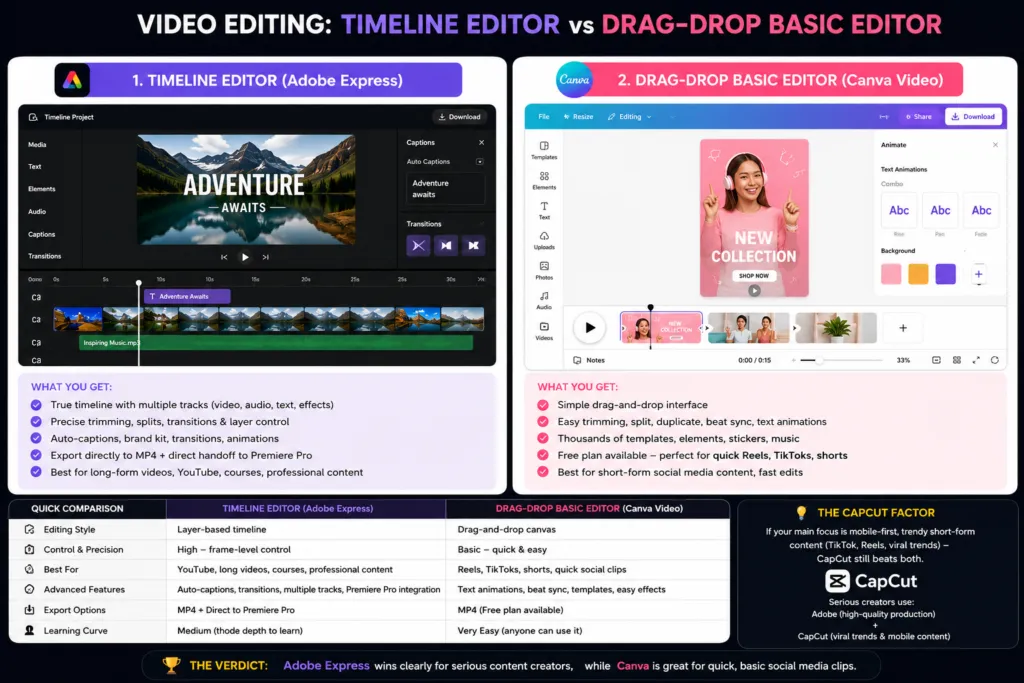
Adobe Express Video: Features a true timeline-based editor with auto-captions, transitions, and direct export to MP4. The biggest advantage? It integrates directly with Premiere Pro, meaning you can start a project in Express and hand it off for professional finishing.
Canva Video: Vastly improved for 2026. It now supports video trimming, beat sync, and text animations inside the familiar drag-and-drop interface. Because it’s available on the free plan, it’s the default choice for quick Reels and TikToks.
💡 The CapCut Factor: If your main focus is mobile-first, trendy short-form content, CapCut still beats both. Serious creators typically use Adobe for high-quality production, and CapCut specifically for viral TikTok trends.
Which Is Better for YouTube Thumbnails?
Choose Canva if: You want speed. It offers hundreds of YouTube thumbnail templates with simple, one-click customization. Perfect for casual or new YouTubers.
Choose Adobe Express if: You want premium quality. Adobe’s templates look more professionally polished, and Firefly’s AI-generated backgrounds produce visually striking results that Canva cannot match. Preferred by high-production channels.
7. Adobe Express vs Canva vs Figma vs Microsoft Designer — 3-Way Comparison
The Context: For 99% of solopreneurs and small businesses, the real choice is only between Adobe Express and Canva. However, if you are wondering about the broader design landscape, here is how the alternatives stack up:
Figma: A professional UI/UX tool built for app developers and product designers. It is not a template-based tool for social media or marketing.
Microsoft Designer: An AI-first tool built on DALL-E. It is highly compelling if you already pay for a Microsoft 365 subscription, but its template library is still too limited to be a standalone Canva replacement.
| Platform | Adobe Express | Canva | Figma | Microsoft Designer |
|---|---|---|---|---|
| Best For | Adobe users, video | Beginners, SMBs | UI/UX designers | Microsoft 365 users |
| Learning Curve | Low | Very Low | High | Very Low |
| Free Plan | ✅ Generous | ✅ Best-in-class | ✅ (limited) | ✅ (365 users) |
| AI Tools | Firefly (best) | Magic Studio | Limited | DALL-E (strong) |
| Templates | 25,000+ | 250,000+ | Community (free) | Growing |
| Video Editing | ✅ Strong | ✅ Moderate | ❌ No | ❌ No |
| Collaboration | ✅ Moderate | ✅ Strong | ✅ Industry-best | ✅ Via Teams |
| Price (Paid) | $9.99/month | $15/month | $15/editor/mo | Included in M365 |
8. Adobe Express vs Canva — Pros and Cons
The following Adobe Express vs Canva pros and cons reflect aggregated feedback from G2, Capterra, Reddit, and TechRadar. Therefore, the points below represent documented user consensus — not personal testing claims.
ADOBE EXPRESS PROS
- Adobe Firefly AI delivers industry-leading, commercially-safe image generation
- Included free in Creative Cloud — zero additional cost for existing Adobe subscribers
- Background removal available on free plan — one of the only tools to offer this
- PDF conversion and editing tools available at no cost
- Superior video editing with timeline editor and Premiere Pro integration
- Adobe Stock integration for high-quality licensed photography
- Premium plan at $9.99/month — $5/month cheaper than Canva Pro
ADOBE EXPRESS CONS
- Template library (25,000+) is significantly smaller than Canva’s 250,000+
- Social media scheduling is basic — no full content calendar or planner
- Collaboration tools are weaker than Canva for teams and agencies
- Brand Kit locked behind Premium plan — no free brand customization
- Less beginner-friendly than Canva for users with zero design experience
- Smaller user community — fewer tutorials, third-party templates, and courses
CANVA PROS
- 250,000+ templates — largest library of any design tool for non-designers
- Most generous free plan in the industry — 1M+ stock photos, 5GB storage
- Real-time collaboration with comments, approvals, and shared workspaces
- Built-in Content Planner for social media scheduling (Pro)
- 170M+ users — massive community, tutorials, and third-party content
- Magic Studio AI suite — Magic Write, Magic Edit, Magic Design in one platform
- 1TB storage on Pro plan — ideal for teams with large media libraries
CANVA CONS
- Background removal is a Pro-only feature — not available on free plan
- Video editing is less powerful than Adobe Express — no Premiere Pro integration
- Magic Studio AI image generation uses a proprietary model based on Leonardo.AI — still carries slightly more commercial safety uncertainty than Adobe Firefly
- Pro plan at $15/month — $5/month more expensive than Adobe Express Premium
- SVG export (vector format) locked behind Pro — limits free plan for logo work
- No native Adobe integrations — switching to professional tools requires file export
9. Who Should Choose Adobe Express vs Canva?
Neither platform suits every user perfectly. Choosing the wrong tool leads to friction and wasted subscription money. Use the matrix below to match your exact workflow.
| User Type | Recommended Tool | Reason |
|---|---|---|
| First-time designer / Student | Canva ✅ | Easiest onboarding, most free templates |
| Adobe Creative Cloud subscriber | Adobe Express ✅ | Already included — zero extra cost |
| Small business owner (marketing) | Canva ✅ | Social scheduling, brand kit, team collab |
| YouTube / Video content creator | Adobe Express ✅ | Better video editor + Premiere integration |
| Freelance graphic designer | Adobe Express ✅ | Firefly AI, Adobe Stock, CC integration |
| Social media manager (agency) | Canva ✅ | Content Planner, real-time collab, volume |
| eCommerce store owner | Canva ✅ | Product graphics, social templates, easy |
| Enterprise marketing team | Both ⭐ | Canva Teams + Adobe Express via CC |
| Blogger / Content creator | Canva ✅ | Grammarly + Canva = complete content stack |
💡 Build Your Productivity Stack: To get the most out of your design workflow, pair it with the right backend systems:
- Perfect your ad copy and content with our Grammarly Review 2026.
- Streamline your team’s communication using the Best Tools for Remote Teams 2026.
- Manage your entire operation with our guide to Productivity Tools for Small Businesses.
10. Adobe Express vs Canva Reddit — What Real Users Say
Looking at Adobe Express vs Canva Reddit threads across r/graphic_design, r/web_design, r/smallbusiness, r/canva, and r/entrepreneur, the 2026 sentiment shows Canva as the clear community favorite — but Adobe Express earning respect from Creative Cloud users. Specifically, the Adobe Express vs Canva Reddit debate consistently highlights the same dividing line: Adobe for professionals already in the ecosystem, Canva for everyone else.
The recurring themes we saw in these discussions (paraphrased, not direct quotes):
💬 On r/canva, the common view is that Canva’s free template library is still far larger, so most people see no reason to switch.
💬 Creative Cloud subscribers on r/graphic_design often point out that Adobe Express Premium comes included with their plan, which makes it an easy add.
💬 For quick social graphics, small-business users usually prefer Canva’s template variety over Adobe Express’s higher-quality but smaller selection.
💬 Some creators say Adobe Express’s Firefly-generated backgrounds look more realistic than Canva’s AI images, especially for thumbnails.
💬 A popular take on r/entrepreneur: use both — Canva Free for quick templates, Adobe Express for AI-powered work.
11. Adobe Express vs Canva — FAQ
Yes, both offer free plans. Canva’s free plan is more generous overall (250,000+ templates), but Adobe Express Free uniquely includes PDF editing tools, AI credits, and background removal at no cost.
No, Canva is still the undisputed choice for beginners. Its drag-and-drop editor and template organization are much more intuitive, though Adobe Express has vastly improved its interface in 2026.
Adobe Express. Its Firefly AI is trained strictly on licensed Adobe Stock images, making it 100% commercially safe. Canva’s Magic Studio is powerful and now runs on a proprietary model based on Leonardo.AI, but Adobe Firefly still holds an edge for commercial safety in business use.
For most small businesses: No (Canva has better social scheduling and template volume). For video creators or Creative Cloud subscribers: Yes, it can completely replace Canva and save you subscription fees.
Canva is better for managing social media, thanks to its built-in content scheduler and massive template library. Adobe Express is better if your only focus is designing high-end, premium-looking individual graphics.
12. Final Verdict
Based on aggregated user reviews from G2, Reddit, and Capterra, Canva remains the best design tool for most small businesses and beginners due to its massive template library, team collaboration, and ease of use.
However, Adobe Express is the ultimate choice for Creative Cloud subscribers, video creators, and businesses needing commercially safe AI images. At $9.99/month, it’s also cheaper than Canva Pro.
💡 The Next Step: Great design needs a great distribution channel. Pair your graphics with the best free email marketing tools 2026 to run complete, high-converting campaigns straight from your design dashboard.
Decision Matrix — Choose by Use Case
| Feature | Adobe Express | Canva |
|---|---|---|
| Ease of Use | ⭐⭐⭐⭐ | ⭐⭐⭐⭐⭐ |
| Free Plan | ⭐⭐⭐⭐ | ⭐⭐⭐⭐⭐ |
| AI Tools | ⭐⭐⭐⭐⭐ | ⭐⭐⭐⭐ |
| Template Quality | ⭐⭐⭐⭐ | ⭐⭐⭐⭐⭐ |
| Video Editing | ⭐⭐⭐⭐⭐ | ⭐⭐⭐⭐ |
| Integrations | ⭐⭐⭐⭐⭐ | ⭐⭐⭐⭐ |
| Pricing Value | ⭐⭐⭐⭐⭐ | ⭐⭐⭐⭐ |
| OVERALL | ⭐⭐⭐⭐ | ⭐⭐⭐⭐½ |