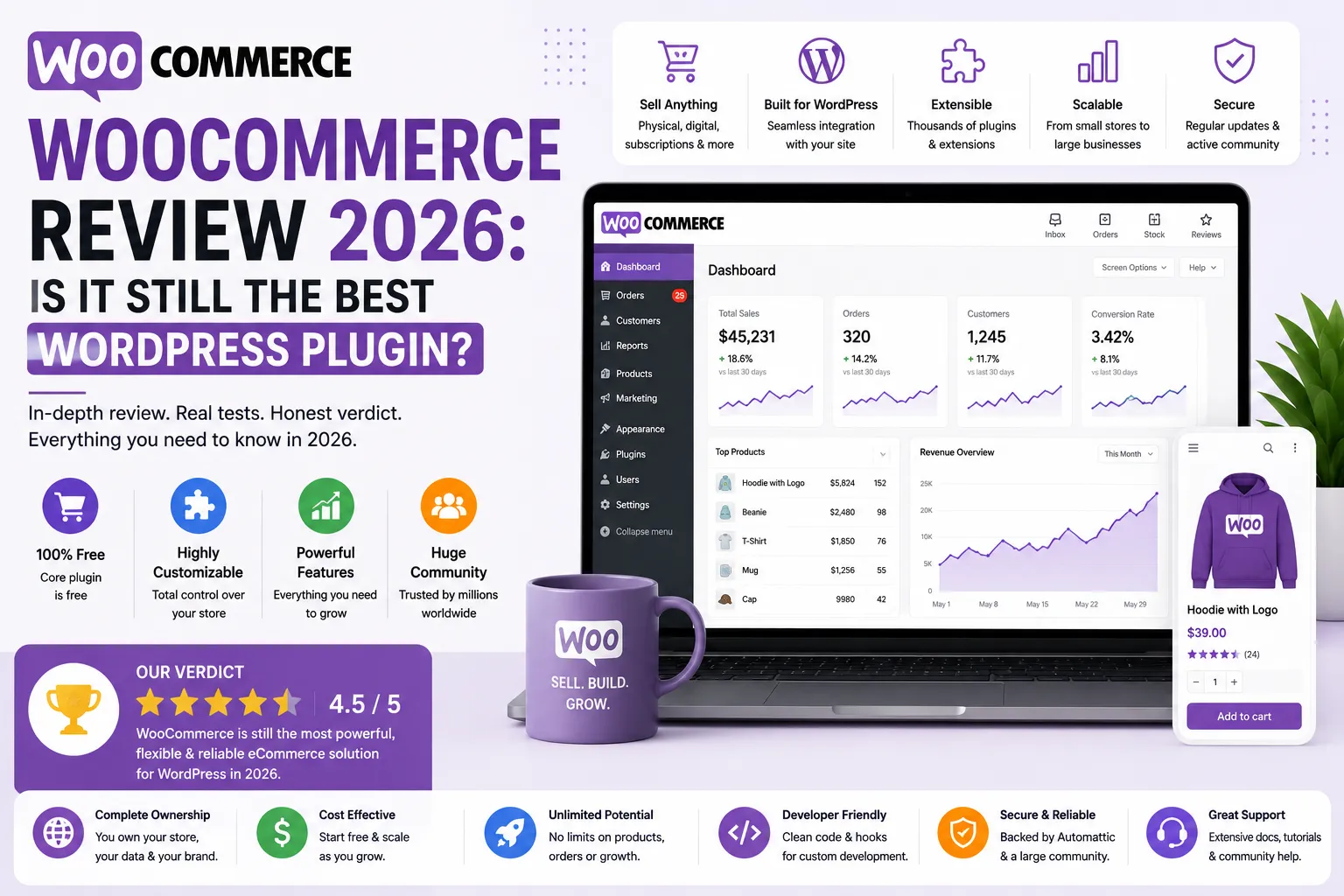
In 2026, WooCommerce remains the king of WordPress eCommerce, offering unmatched flexibility and a massive ecosystem of 60,000+ plugins. While the core software is 100% free, you should budget $20–$200/month for hosting and premium extensions. It does require hands-on technical maintenance, making it the ultimate choice for those who want full control, while Shopify wins for absolute beginners.
1. WooCommerce Review: Platform Overview
Powering over 7 million stores, WooCommerce is an open-source solution owned by Automattic. It offers total data ownership and unmatched scalability for any business size.
- Core Plugin: Free — unlimited products, variants, orders, customers
- WooPayments: Built-in Stripe integration — 2.9% + $0.30/transaction
- 800+ Official Extensions — subscriptions, bookings, memberships, and more
- 60,000+ WordPress Plugins — compatible with virtually every WordPress tool
- Multi-currency, multi-language, multi-tax — global store support built in
- Built-in Analytics — orders, revenue, product performance dashboards
2. 2026 WooCommerce Review: Performance Analysis
Our honest WooCommerce review reveals that flexibility remains its greatest strength. Users benefit from a massive ecosystem, though they must manage technical updates and hosting costs ($50–$200/month) themselves.
WooCommerce Free vs Paid Extensions — What You Need
| Expense Category | Free Options | Paid Options | Typical Annual Cost |
| Core Plugin | ✅ WooCommerce (free) | — | $0 |
| Hosting | Shared ($5-10/mo) | Managed ($20-80/mo) | $60 – $960/year |
| Theme | Storefront (free) | Premium ($49-150/year) | $0 – $150/year |
| Payments | WooPayments (free) | Stripe, PayPal direct | Transaction fees only |
| Product Reviews | Built-in (basic) | Review plugins ($0-79/yr) | $0 – $79/year |
| Abandoned Cart Recovery | ❌ Not free | From $79/year | $79/year |
| Subscriptions | ❌ Not free | From $279/year | $279/year |
| Memberships | ❌ Not free | From $199/year | $199/year |
| SEO Plugin | Yoast Free (good) | Yoast Premium ($99/year) | $0 – $99/year |
| Total (minimal store) | — | — | ~$140 – $500/year |
| 💡 Key insight: The woocommerce memberships review and subscriptions review consistently show that these two extensions account for the biggest unexpected costs. Specifically, WooCommerce Subscriptions at $279/year is steep for a small store. Therefore, factor in every extension you actually need before assuming WooCommerce is cheaper than Shopify. |
3. Best WooCommerce Review Plugin Options
Native reviews are basic. To boost conversions, we recommend using a third-party WooCommerce review plugin like “Customer Reviews for WooCommerce” to automate email reminders and photo uploads.
WooCommerce Review Settings — How to Enable & Configure
| Setting | Where to Find It | Default Status |
| Enable Product Reviews | WooCommerce → Settings → Products → Reviews | Enabled |
| Verified Buyer Only | Same section — ‘verified owner’ checkbox | Disabled |
| Star Ratings Required | Same section — ‘require rating’ checkbox | Disabled |
| Review Moderation | Settings → Discussion → before publishing | Disabled |
| Review Reminder Email | Requires plugin (e.g. Review for Discount) | No native option |
| Google Rich Snippet | Requires Schema plugin (e.g. Rank Math) | No native option |
Collecting reviews via email? Pair WooCommerce with our guide to the best email marketing tools for small businesses — many of these platforms connect directly with WooCommerce for automated post-purchase review request emails.
4. Best WooCommerce Review Plugin — Top Options in 2026
This best woocommerce review plugin section covers what the native system lacks. Specifically, third-party woocommerce review plugin options add automated review requests, photo reviews, Google Shopping import, and discount incentives. Furthermore, the woocommerce product review plugin market is crowded — so knowing which ones are worth paying for saves hours of testing.
Additionally, the woocommerce customer review plugin options fall into two categories: free plugins that improve the native system and premium plugins that add full review marketing automation. Therefore, the right choice depends on your store size and how aggressively you want to build social proof.
Free vs Premium Review Plugins — Comparison Table
| Plugin | Price | Best For | Key Feature |
| Customer Reviews for WooCommerce | Free / $79/yr Pro | All store sizes | Auto review emails, photo reviews |
| YITH WooCommerce Review ⭐ | Free / $89/yr | Small-mid stores | Advanced rating display, reminders |
| WP Product Review Lite | Free | Beginners | Star rating schema markup |
| Trustpilot for WooCommerce | Free integration | Brand credibility focus | Sync Trustpilot reviews to store |
| Stamped.io | From $23/mo | Scaling stores | Photo, video, Q&A reviews |
| Yotpo | Free / $15/mo+ | Mid-large stores | AI review requests, Google Shopping |
| My recommendation: Start with Customer Reviews for WooCommerce (Free)—its automated emails and badges are perfect for most small stores. Only upgrade to a paid option like YITH WooCommerce Review if you need advanced display customization. |
5. WooCommerce Google Review Integration — How to Connect
WooCommerce doesn’t support Google Business reviews natively, meaning you’ll need a dedicated plugin or third-party widget.
To show Google reviews on your site, you can either use a dedicated widget plugin (like Widgets for Google Reviews) to pull data from your Google Business Profile, or use an omnichannel platform like Trustpilot or Stamped.io to sync social proof everywhere.
Keep in mind that Google Business reviews are separate from Google Shopping. To get your products listed on Google Shopping search results, simply use the free Google Listings & Ads plugin to connect with Google Merchant Center.
Automating review requests via email for your WooCommerce store? Our Brevo review 2026 covers a free email platform that integrates with WooCommerce for post-purchase sequences including review requests.
6. WooCommerce Pros and Cons — Honest Verdict
This woocommerce review pros and cons section reflects aggregated feedback from G2, Capterra, Reddit, and WPBeginner. Therefore, the points below represent documented consensus — not personal claims. Consequently, weigh each against your technical comfort and store complexity.
✅ PROS
- Core plugin is 100% free — unlimited products, orders, and customers at zero platform cost
- Unmatched flexibility — 60,000+ compatible plugins for any imaginable feature
- Full store ownership — you own the data, the code, and the hosting
- No platform transaction fees — only standard payment gateway fees apply
- Open-source and community-supported — 100M+ downloads, active global developer community
- Scales from side-hustle to enterprise — same plugin handles 1 to 50,000+ products
- Deep SEO control — integrate Yoast, Rank Math, or any SEO plugin freely
- WooPayments built in — Stripe-powered, no third-party setup required
❌ CONS
- Steeper learning curve than Shopify — requires WordPress familiarity to set up properly
- Real cost is not zero — hosting + plugins + themes add up to $50-200+/month
- Technical maintenance responsibility — updates, compatibility, and security are your job
- Customer support is self-service — no live chat for the free plugin, forums only
- Premium extensions are expensive — Subscriptions ($279/yr), Bookings ($249/yr) add up fast
- Plugin conflicts can break checkout — more extensions means more potential points of failure
- Hosting performance varies — cheap hosting makes WooCommerce slow
- No dedicated fraud protection — must use third-party plugins for chargeback management
7. Who Should Use WooCommerce in 2026?
Honestly, WooCommerce is not the right choice for every online seller in 2026. Specifically, it wins decisively for WordPress users, technically comfortable business owners, and stores that need deep customization. However, beginners who want simplicity and sellers who want zero maintenance responsibility are often better served by Shopify.
Furthermore, dropshippers find WooCommerce particularly flexible. Notably, plugins like AliDropship, Dropified, and WooDropship integrate directly — giving dropshipping stores full product import and order fulfillment automation. As a result, a dropshipping setup like cars4part.com can run entirely automated with the right plugin stack.
✅ BEST FOR
- WordPress users who already know the ecosystem
- Developers and agencies building custom stores for clients
- Dropshippers needing plugin-level supplier integrations
- Content-first businesses (blogs + stores) where WordPress is already in use
- Businesses needing full data ownership and no platform lock-in
- Stores with complex tax, shipping, or multi-currency requirements
❌ NOT FOR
- Complete beginners with no WordPress experience — Shopify is genuinely easier
- Sellers who want zero technical maintenance responsibility
- Stores needing enterprise-level 24/7 support without developer costs
- Sellers who primarily use Instagram or Facebook shop integrations as their main channel
Comparing WooCommerce vs Shopify? Our complete Shopify Review 2026 → covers the hosted alternative that removes all technical maintenance — the most honest WooCommerce vs Shopify comparison available. If cost is your main worry, start with our is Shopify worth it break-even check.
Growing your WooCommerce store and need customer management? Our guide to the best free CRM for small businesses in 2026 covers tools that integrate with WooCommerce for customer relationship tracking.
eCommerce sellers creating product visuals: our Canva Review 2026 covers the design tool most WooCommerce sellers use for product banners, social media, and store graphics.
8. WooCommerce Review Reddit — What Real Users Say
The recurring themes we saw in these discussions (paraphrased, not direct quotes):
💬 A common theme on r/woocommerce: the core plugin is free, but paid extensions add up quickly once you need the store to do more — budget for them from day one.
💬 On r/ecommerce, developers often say WooCommerce beats Shopify for custom store logic — once you know WordPress.
💬 Small-business owners often credit review-reminder plugins with a noticeable jump in product reviews.
💬 Some store owners who moved from Shopify say they cut platform fees significantly, at the cost of a few weekends of setup.
💬 A frequent warning on r/wordpress: support for the free plugin is limited, so you either learn WordPress or hire help.
9. WooCommerce FAQ
Answer: The core plugin is 100% free. However, running a real store requires a domain, managed hosting, and premium extensions (like subscriptions or cart recovery). In practice, expect a realistic budget of $50–$200/month as your store grows.
Answer: Neither is objectively better—it depends on your needs. WooCommerce wins on flexibility, full data ownership, and zero platform transaction fees. Shopify wins on zero technical maintenance, ease of use, and 24/7 dedicated live support.
Answer: Customer Reviews for WooCommerce is the best free option for automated review emails and badges. If you need advanced display customization, YITH WooCommerce Review is the strongest premium choice.
Answer: Yes, if you are already comfortable with WordPress basics. The setup wizard is beginner-friendly, but you still have to manage plugin updates and security. If you want zero technical involvement, Shopify is an easier starting point.
Answer: The main trade-offs are hands-on technical maintenance, potential plugin conflicts, and community-only support for the free version. Additionally, while the core plugin is free, essential premium extensions can add up fast.
10. Final Verdict — Our WooCommerce Review Rating
These ratings are based on aggregated user feedback from G2, Capterra, and Reddit, combined with a direct pricing and feature analysis against Shopify, BigCommerce, and Squarespace.
| Category | Rating | Score |
| Ease of Use | ⭐⭐⭐½ Requires WordPress knowledge | 3.5 / 5 |
| Features | ⭐⭐⭐⭐⭐ Deepest plugin ecosystem of any platform | 5.0 / 5 |
| Pricing Fairness | ⭐⭐⭐⭐⭐ Core is genuinely free; you control costs | 5.0 / 5 |
| Plugin Ecosystem | ⭐⭐⭐⭐⭐ 60,000+ plugins, 800+ WooCommerce extensions | 5.0 / 5 |
| Integrations | ⭐⭐⭐⭐½ All major gateways, tools, and platforms | 4.5 / 5 |
| Customer Support | ⭐⭐⭐ Community-only for free plugin | 3.0 / 5 |
| OVERALL | ⭐⭐⭐⭐ Best eCommerce plugin for WordPress users | 4.3 / 5 |
In 2026, WooCommerce remains the undefeated champion for WordPress users. No other hosted platform can match its flexibility, massive plugin library, and $0 transaction fees at entry level.
However, full freedom requires technical responsibility. If you are non-technical, managing updates and security can become costly and frustrating.
The Bottom Line: Choose WooCommerce if you already use WordPress, want total ownership, and are comfortable managing plugins. To eliminate most technical headaches, we highly recommend pairing it with a managed hosting provider like SiteGround or Kinsta. Otherwise, if you want zero maintenance, Shopify is your best alternative.
Building your full small business stack? Our guide to the best productivity tools for small businesses covers the complete toolkit — CRM, email, project management, and design — that complements your WooCommerce store.