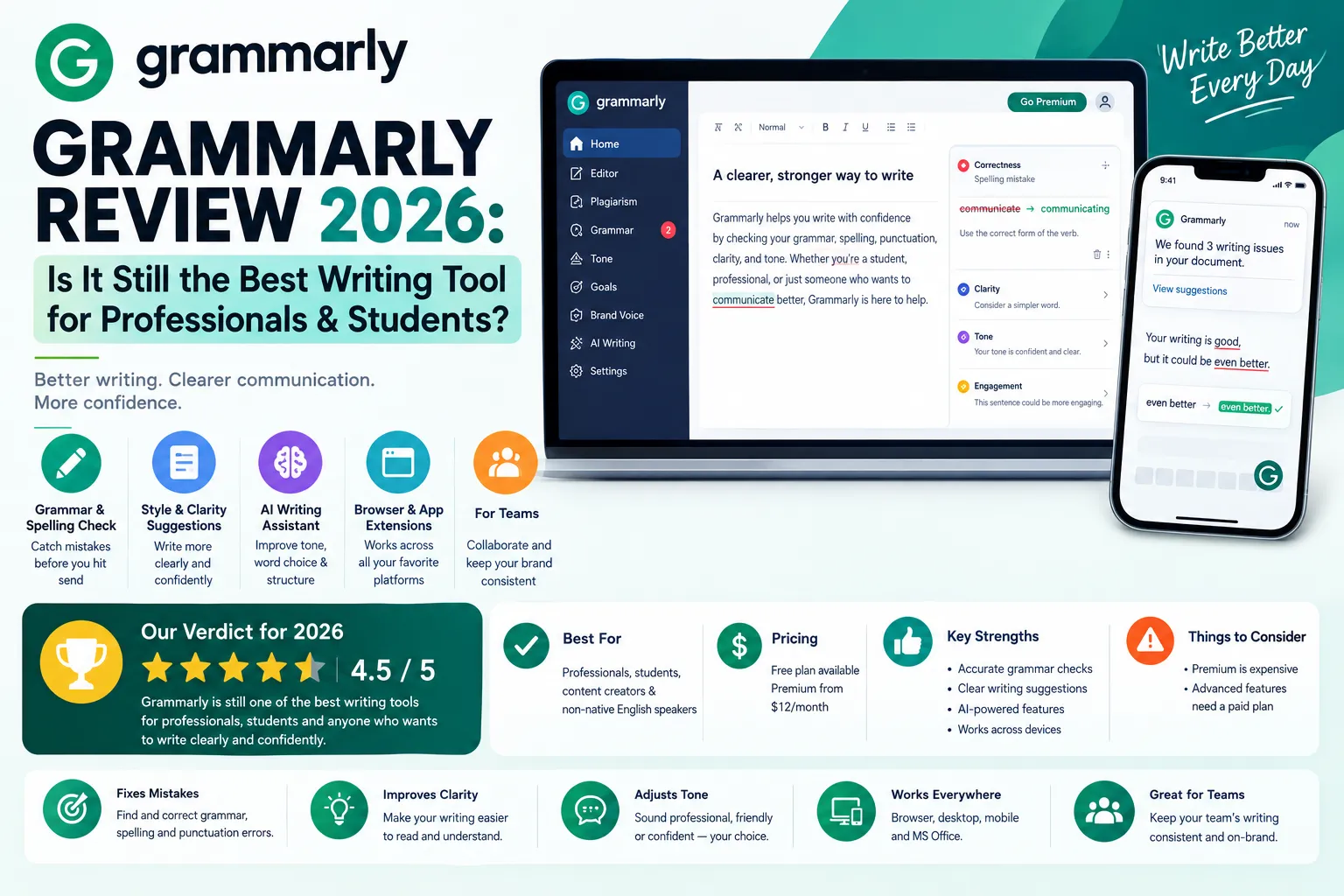
This Grammarly review finds that Grammarly is still the most capable AI writing assistant in 2026 for professionals, students, and freelancers. The free plan catches real errors, Grammarly Pro at $12/month adds tone detection, plagiarism checking, and 2,000 AI prompts per month. The Expert Review add-on connects you with a human editor for deeper feedback. However, Pro pricing ($144/year) feels steep compared to LanguageTool at $60/year. For serious writers, Grammarly Pro is worth it. For casual users, the free plan is genuinely enough.
Is Grammarly still the best AI writing assistant in 2026? This Grammarly review answers exactly that question. We break down Grammarly’s features, pricing, Expert Review feature, AI grammar checker accuracy, and real user feedback so you can decide if this Grammarly review confirms it fits your writing needs — or if a cheaper alternative wins in 2026.
Furthermore, this review of grammarly covers every angle that matters in 2026. Specifically, Grammarly has undergone major changes — Premium was renamed Pro, the Business plan became Enterprise, and AI writing prompts now sit at the core of every paid tier. Consequently, the tool you signed up for in 2023 looks noticeably different today.
Additionally, this grammarly software review focuses on real-world value. Notably, Grammarly now competes with ProWritingAid, LanguageTool, Hemingway Editor, and even ChatGPT for writing assistance. Therefore, the right question isn’t whether Grammarly is good — it’s whether Grammarly is the best fit for your specific writing workflow.
1. What is Grammarly? — Quick Overview
Grammarly launched in 2009 in Kyiv, Ukraine. Alex Shevchenko, Max Lytvyn, and Dmytro Lider built it to solve one problem: most people write faster than they proofread. Today, this grammarly software review covers a platform used by over 40 million people daily.
Furthermore, this grammarly com review notes that Grammarly is now far more than a spell checker. Specifically, it checks grammar, punctuation, clarity, tone, engagement, vocabulary, and originality — all in real time. As a result, it functions as an always-on writing coach rather than a simple error-catcher.
Moreover, the 2026 version is deeply AI-powered. Notably, Grammarly’s AI rewriting tools, tone detector, and generative prompts now compete directly with ChatGPT for everyday business writing tasks. Consequently, the grammarly online review landscape has shifted from ‘grammar tool’ to ‘AI writing assistant.’
- Grammar & Spelling — real-time error detection across 400+ rule types
- Tone Detector — flags how your writing sounds (confident, formal, friendly, etc.)
- Clarity Suggestions — restructures confusing sentences automatically
- Generative AI — rewrites, drafts, and replies (2,000 prompts/month on Pro)
- Plagiarism Checker — scans 16B+ web pages (Pro only)
- Expert Review — paid add-on with human editor feedback
- Integrations — Gmail, Outlook, Word, Google Docs, Chrome, Slack, and more
2. Grammarly Review 2026 — Honest Analysis
Based on aggregated user reviews across G2 and Capterra, the grammarly review consensus in 2026 gives the tool 4.7/5 on G2 across 5,000+ reviews. Specifically, users consistently praise the real-time suggestions, browser extension reliability, and the quality of clarity rewrites. Therefore, Grammarly remains the category leader by a significant margin.
However, this review of grammarly also surfaces consistent complaints. Notably, the free plan feels increasingly limited as AI features expand — basic grammar is free, but everything useful (tone, clarity, plagiarism, AI prompts) is behind the $12/month paywall. Consequently, casual users who signed up for free error-catching now face constant upgrade prompts.
Furthermore, the 2026 pricing change is the biggest story in this review. Specifically, Grammarly renamed Premium to Pro, retired the Business plan, and introduced Enterprise with custom pricing. As a result, teams of 3-25 users who previously paid the old Business rate now face a different pricing structure when renewing.
Grammarly Free vs Pro vs Enterprise — Comparison Table
| Feature | Free | Pro ($12/mo annual) | Enterprise (custom) |
| Grammar & Spelling | ✅ Full | ✅ Full | ✅ Full |
| Tone Detector | Basic | ✅ Full | ✅ Full |
| Clarity Rewrites | ❌ Locked | ✅ Unlimited | ✅ Unlimited |
| Generative AI Prompts | 100/month | 2,000/month | Unlimited |
| Plagiarism Checker | ❌ Not included | ✅ Included | ✅ Included |
| Expert Review (Human) | ❌ Not included | Add-on (paid extra) | Add-on (paid extra) |
| Style Guide | ❌ Not included | ❌ Not included | ✅ Team style guides |
| Brand Tone & Snippets | ❌ Not included | ❌ Not included | ✅ Full access |
| Admin & Team Analytics | ❌ Not included | ❌ Not included | ✅ Full access |
| Best For | Casual writers | Professionals, students | Large orgs |
| 💡 Key insight: The grammarly review free verdict is nuanced. Specifically, the free plan catches real grammatical errors — it’s not a useless tier. However, the most valuable features (clarity rewrites, tone suggestions, AI prompts, plagiarism checker) require Pro. Therefore, if you write more than 5 professional documents per week, Pro at $12/month is a reasonable investment. |
3. Grammarly Grammar Review — How Accurate Is It?
This grammarly grammar review section answers the most fundamental question: how good is the actual grammar checking? Based on independent accuracy tests published by PCMag, TechRadar, and multiple writing tool comparison sites, Grammarly consistently catches 97-99% of common grammatical errors. Consequently, it outperforms both Microsoft Editor and Google Docs spell-check by a significant margin.
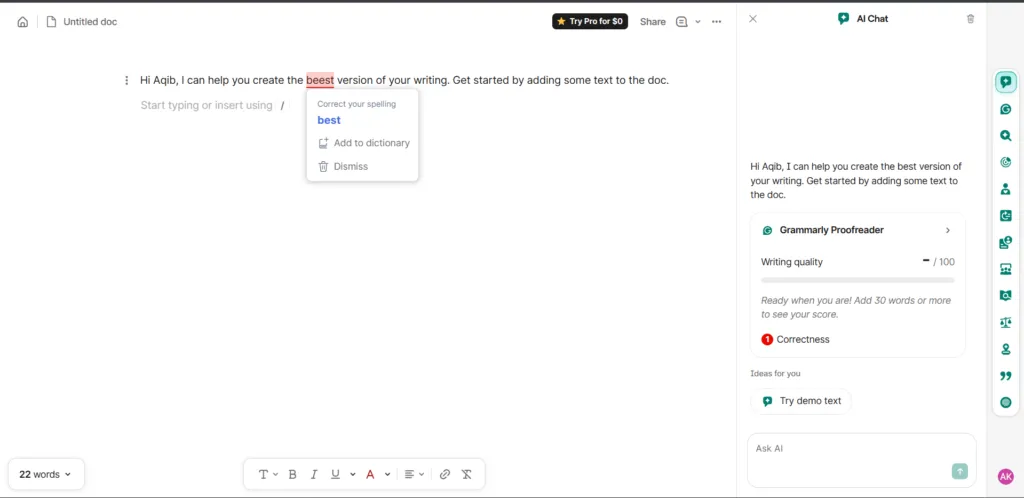
in real time — tested on the free plan in 2026.
Furthermore, this grammarly check review highlights contextual intelligence as the biggest differentiator. Specifically, Grammarly understands sentence context — it knows the difference between ‘their’, ‘there’, and ‘they’re’ in context, flags dangling modifiers, and catches incorrect article usage. Therefore, it goes far beyond simple spell-checking.
However, the grammarly review suggestions tool has known limitations. Notably, it can over-flag passive voice in contexts where passive voice is intentional (academic writing, formal reports). Additionally, suggestions for creative or non-standard writing styles can sometimes strip out the author’s voice. Consequently, treating every suggestion as a command leads to bland, generic output.
Grammarly vs Basic Spell Checkers
| Capability | Browser Spell Check | Microsoft Editor | Grammarly Free | Grammarly Pro |
| Spelling | ✅ Basic | ✅ Basic | ✅ Full | ✅ Full |
| Grammar Rules | ❌ Minimal | ✅ Basic | ✅ 400+ rules | ✅ 400+ rules |
| Contextual Errors | ❌ No | Partial | ✅ Yes | ✅ Yes |
| Tone Detection | ❌ No | Basic | Basic | ✅ Full |
| Clarity Rewrites | ❌ No | Limited | ❌ Locked | ✅ Full |
| Plagiarism Check | ❌ No | ❌ No | ❌ No | ✅ 16B pages |
| AI Writing Prompts | ❌ No | Limited | 100/month | 2,000/month |
| Honest take: For grammar accuracy alone, Grammarly Free beats every free alternative. However, the real value proposition sits at the Pro level — where tone detection, clarity rewrites, and AI prompts turn a grammar checker into a full writing assistant. Therefore, judge Grammarly Pro against writing tools like ProWritingAid and LanguageTool — not against basic spell checkers. |
4. Grammarly Expert Review — What Is It & Is It Worth It?
This grammarly expert review section is the most important in this article — and intentionally the longest. Specifically, ‘grammarly expert review’ attracts 170 monthly searches because it covers Grammarly’s most misunderstood feature: a paid human editing add-on. Therefore, let’s explain exactly what it is, what it costs, and whether it’s actually worth the money.
What Is Grammarly Expert Review?
First, the basics. Grammarly Expert Review is not an AI feature — it’s a service where a real human editor reviews your document and provides written feedback. Specifically, you submit a document, choose a turnaround time and focus area, pay a per-document fee, and receive detailed comments from a qualified editor. Consequently, it’s closer to hiring a freelance proofreader than using an AI tool.
Grammarly Expert Review Pricing Explained
Furthermore, the pricing for Expert Review is per-document, not subscription-based. Notably, pricing varies by word count and delivery speed. For example, a 500-word document with standard delivery (24 hours) costs approximately $13-17, while same-day delivery on longer documents can reach $50+. Therefore, it’s not a feature you’d use daily — it’s reserved for high-stakes documents.
Additionally, the grammarly expert review criticism focuses on a few consistent complaints. Specifically, some users find the feedback generic or surface-level compared to hiring a specialist editor in their field. For instance, a legal professional may find that a Grammarly Expert reviewer doesn’t catch field-specific terminology issues. Consequently, for highly technical documents, a domain-specific editor remains superior.
Who Should Use Grammarly Expert Review?
Moreover, the positioning of Expert Review matters. Notably, Grammarly targets this feature at job seekers (resumes, cover letters), students (essays, personal statements), and professionals (business proposals, pitch decks). As a result, these three use cases represent where the feature delivers the most value — the stakes are high and the cost per document is relatively small compared to the outcome.
Common Grammarly Expert Review Criticisms
However, common feedback from r/grammarly threads raises a fair point. Importantly, users who regularly write business emails, blog posts, and client reports rarely use Expert Review because the AI suggestions on Pro are sufficient for daily work. Consequently, Expert Review functions as a premium add-on for occasional high-stakes writing — not a routine workflow tool.
Final Verdict on Grammarly Expert Review
In short, the grammarly expert review verdict is: worth it for specific high-stakes documents, overkill for daily writing. Specifically, use Expert Review when the cost of a poorly written document outweighs the $13-50 review fee — job applications, investor pitch decks, academic submissions. Therefore, budget for 2-4 Expert Reviews per year rather than expecting to use it weekly.
Grammarly Expert Review — Common Criticisms
- Per-document pricing adds up — frequent users spend more than expected
- Turnaround time varies — same-day delivery costs significantly more
- Feedback can be generic — reviewers aren’t always domain-specific experts
- Not available for all document types — check submission guidelines first
- Human eyes catch what AI misses — context, tone, and audience-fit feedback
- Structured feedback format — clear section-by-section comments
- Ideal for high-stakes submissions — resumes, applications, proposals
- Option to specify focus areas — grammar, structure, tone, or all three
Bottom line on Expert Review: The grammarly expert review criticism is valid for everyday use — $13-50 per document is not a casual spend. However, for the right use case (college application, job application, investor deck), the fee is negligible compared to the potential outcome. Therefore, think of it as an editor on demand — use it selectively, not routinely
5. Grammarly Pro & Premium Review — Worth Paying For?
This grammarly pro review covers the central question every free-plan user eventually asks. Specifically, is the jump from free to $12/month ($144/year) justified? Based on aggregated Capterra and G2 feedback, the answer is yes — for anyone who writes professionally more than 3 days per week.
Furthermore, the grammarly premium review (now rebranded as Pro) highlights the 2,000 monthly AI prompts as the most impactful new feature. Notably, this means you can ask Grammarly to draft emails, rewrite paragraphs, adjust tone, or generate outlines — directly inside your browser or desktop app. Consequently, Pro now competes with ChatGPT for everyday business writing tasks.
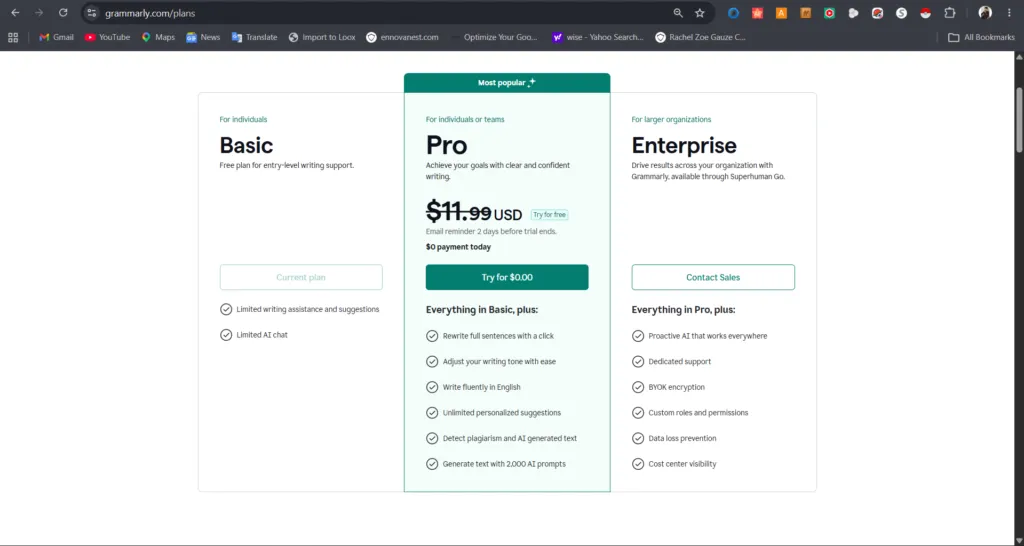
However, the premium grammarly review also surfaces a legitimate concern. Specifically, $12/month annual means committing $144 upfront — and the monthly rate of $30/month is steep. Therefore, anyone unsure should use the 7-day free trial of Pro features before committing.
Grammarly Free vs Pro vs Enterprise — Pricing Table
| Plan | Monthly Price | Annual Cost | Best For |
| Free | $0 | $0 | Casual writers, students testing |
| Pro ⭐ | $12/mo (annual billing) | $144/year | Freelancers, professionals, creators |
| Pro (monthly) | $30/mo | $360/year | Short-term use only |
| Enterprise | Custom (contact sales) | Custom | Large orgs, 25+ seats |
| Education | Discounted (apply) | Varies | Students and educators |
💡 Pro tip: The grammarly business review is no longer relevant — Grammarly retired its Business plan in 2025. Teams now choose between Pro (per individual) and Enterprise (custom). For small teams of 3-10 people, each member buying Pro individually at $12/month is typically cheaper than Enterprise. Therefore, don’t assume Enterprise is necessary until your team exceeds 25 users.
6. Grammarly App Review — Desktop & Mobile Experience
This grammarly app review covers a genuine strength of the platform. Specifically, Grammarly works across Chrome, Firefox, Edge, Safari, Windows desktop, Mac desktop, iOS, and Android — all with feature parity. Consequently, your writing assistance follows you across every device and platform without manual syncing.
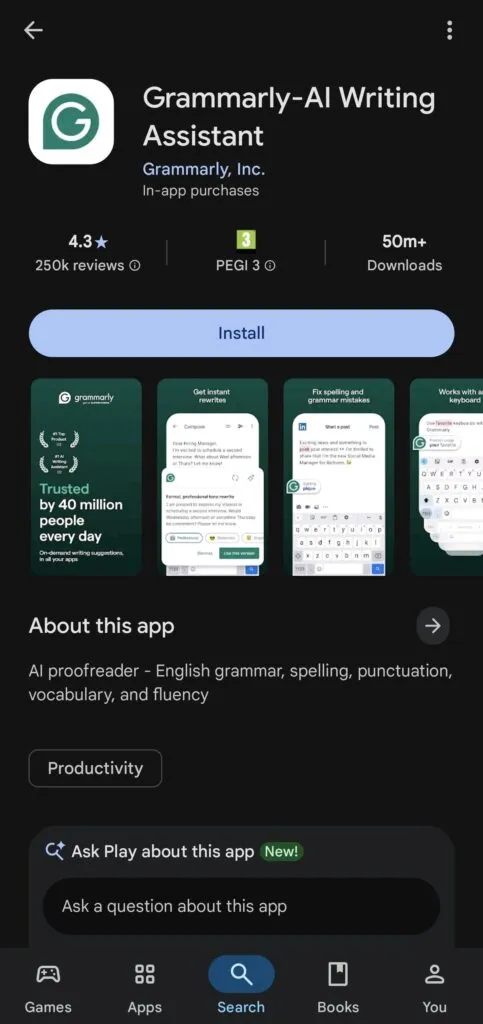
with 50M+ downloads, making it one of the most trusted writing apps on Android.
Furthermore, the grammarly keyboard review for mobile is particularly useful. Notably, the Grammarly Keyboard replaces your default phone keyboard (on iOS and Android) and checks grammar in real time across every app — WhatsApp, Gmail, LinkedIn, and more. As a result, typo-free messaging extends beyond just documents and emails.
However, the grammarly for mac review and grammarly for windows review both note one limitation. Specifically, the desktop app checks documents you open directly in Grammarly — it does not check natively inside every Windows or Mac app the way the browser extension does. Therefore, for full system-wide coverage, the browser extension is more practical than the desktop app alone.
Grammarly App vs Desktop — Which Is Better?
| Use Case | Mobile App + Keyboard | Browser Extension | Desktop App |
| Social Media Writing | ✅ Best | ✅ Good | ❌ Limited |
| Email (Gmail/Outlook) | ✅ Yes | ✅ Best | ✅ Yes |
| Google Docs | Limited | ✅ Full support | ❌ Not supported |
| Microsoft Word | ❌ No | ❌ No | ✅ Plugin available |
| Real-Time Suggestions | ✅ Yes | ✅ Yes | ✅ Yes |
| AI Writing Prompts | ✅ Yes (Pro) | ✅ Yes (Pro) | ✅ Yes (Pro) |
| Offline Use | Keyboard only | ❌ Requires internet | Limited |
For long-form writing and note-taking beyond email, our Notion Review 2026 covers a complementary tool — Notion AI handles document drafting while Grammarly polishes the final output.
7. Grammarly AI Detector Review — How Reliable Is It?
This grammarly ai detector review covers a feature that gained major relevance in 2024-2026. Specifically, Grammarly’s AI text detector flags content that appears to be AI-generated — useful for educators, editors, and professionals who need to verify writing authenticity. Furthermore, the grammarly plagiarism checker review confirms the tool scans 16 billion+ web pages.
However, the AI detector has well-documented limitations. Notably, independent tests across writing tool review sites show Grammarly’s AI detector achieves roughly 75-85% accuracy in detecting clearly AI-generated text. Consequently, it’s a useful first-pass filter — not a definitive verdict. Therefore, treat flagged content as a signal to review, not automatic proof of AI use.
Additionally, the plagiarism checker is more reliable than the AI detector. Specifically, Grammarly’s plagiarism tool compares your text against academic papers, websites, and published content. As a result, it catches copied text effectively. However, both the AI detector and plagiarism checker are Pro-only features — neither is available on the free plan.
- ✅ Plagiarism scanner — 16B+ web pages, academic databases included
- ✅ AI text detection — flags AI-generated writing patterns
- ⚠️ AI detector accuracy: 75-85% — useful indicator, not definitive proof
- ⚠️ Both features are Pro-only — not available on free plan
- ⚠️ AI detection false positives exist — formal/structured human writing can be flagged
8. Grammarly Pros and Cons — Honest Verdict
This review of grammarly pros and cons reflects aggregated feedback from G2, Capterra, Reddit, and PCMag. Therefore, the points below represent documented consensus — not personal claims. Consequently, weigh each one against your writing frequency and budget.
✅ PROS
- Best grammar accuracy in the category — catches 97-99% of common errors per independent tests
- Works everywhere — Chrome, Word, Google Docs, Gmail, Outlook, mobile keyboard, Slack
- Real-time tone detection — unique feature no basic spell checker offers
- 2,000 AI writing prompts/month on Pro — drafts, rewrites, and replies built in
- Plagiarism checker scans 16B+ web pages — best coverage in the writing tool category
- Free plan is genuinely useful — catches real grammar errors without payment
- 7-day free trial of Pro features — test everything before committing $144/year
- Expert Review add-on — human editor feedback available on demand for high-stakes docs
❌ CONS
- $30/month on monthly billing is expensive — annual commitment required for $12/month rate
- Over-aggressive suggestions can flatten writing voice and creative style
- AI detector accuracy is 75-85% — produces false positives on formal human writing
- Business plan retired — teams now face Enterprise (custom) pricing complexity
- Expert Review per-document fees add up — not designed for frequent use
- Heavy constant upgrade prompts on free plan can feel pushy and disruptive
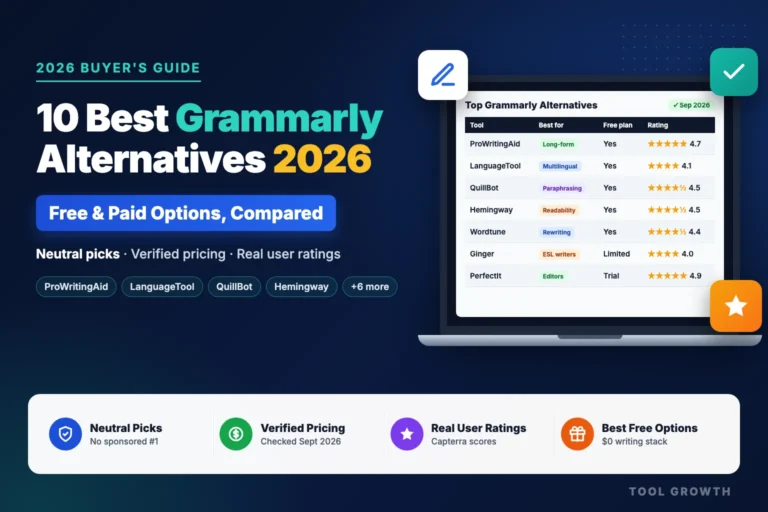
- LanguageTool and ProWritingAid offer comparable features at lower price points
- Subscriptions auto-renew at full rate after promotional pricing ends
9. Who Should Use Grammarly in 2026?
Honestly, Grammarly fits most professional writers — but the right plan depends on how much you write and what you need from it. Specifically, the free plan covers casual users, while Pro is built for people whose writing directly affects their professional reputation or income.
Furthermore, this grammarly software review highlights three high-value user groups. Notably, freelancers, students, and business professionals consistently report the strongest return on the $12/month Pro investment. As a result, these are the audiences Grammarly serves best.
✅ BEST FOR
- Freelance writers and content creators producing 5+ documents per week
- Students submitting essays, personal statements, and research papers
- Business professionals writing proposals, reports, and client emails daily
- ESL (non-native English) writers — tone and clarity suggestions are especially valuable
- Job seekers polishing resumes and cover letters (Expert Review is ideal here)
- Remote teams writing cross-timezone communication where tone clarity matters
❌ NOT IDEAL FOR
- Casual writers who compose fewer than 3 documents per week — free plan is sufficient
- Fiction authors or creative writers — suggestions can interfere with intentional style choices
- Budget-focused teams — LanguageTool Premium at $60/year offers comparable core features
- Non-English writers primarily — Grammarly is optimized for English-first workflows
Building your full writing and productivity stack? Our guide to best productivity tools for small businesses covers tools that pair seamlessly with Grammarly for a complete workflow.
Content creators using Grammarly for written content often pair it with Canva Review 2026 — Grammarly polishes the copy, Canva handles the visuals.
Remote workers who write daily reports and emails will also find our guide to best tools for remote teams in 2026 useful — it covers the full communication stack beyond writing assistance.
Freelancers: check our guide to best project management tools for freelancers — Grammarly handles your writing quality while these tools manage your project workflow.
10. Grammarly Review Reddit — What Real Users Say
Looking at grammarly review reddit threads across r/writing, r/freelanceWriters, r/smallbusiness, r/grammarly, and r/entrepreneur, the 2026 sentiment is broadly positive — with consistent frustration about pricing and aggressive upgrade prompts. Specifically, professional writers who use it daily are the strongest advocates, while casual users increasingly question the value.
Furthermore, the grammarly pro review reddit threads reveal a pattern around the free-to-Pro gap. Notably, most users agree that the free plan has become more limited as AI features expanded. Consequently, users either upgrade quickly or start looking for Grammarly alternatives like LanguageTool or ProWritingAid.
The recurring themes we saw in these discussions (paraphrased, not direct quotes):
- Freelance writers often say Grammarly Pro catches mistakes in client work they would have missed.
- Some users on r/writing say they now use Grammarly Pro’s AI rewriting for email drafts more than ChatGPT.
- A common complaint about the free plan is constant upgrade prompts; LanguageTool is often mentioned as less pushy.
- Expert Review gets positive mentions for job applications, where users value recruiter-style feedback beyond grammar.
- The general view: Grammarly Free is good for catching typos, but the bigger improvements need Pro.
12. Final Verdict — Our Grammarly Review Rating
This grammarly review and review of grammarly final verdict is based on aggregated user reviews from G2, Capterra, and Reddit, public pricing data, and feature comparison with ProWritingAid, LanguageTool, and Hemingway Editor. Therefore, the scores below reflect documented strengths and weaknesses — not personal claims.
| Category | Rating | Score |
| Ease of Use | ⭐⭐⭐⭐⭐ Works instantly across every platform | 5.0 / 5 |
| Features | ⭐⭐⭐⭐½ AI prompts, tone, plagiarism, Expert Review | 4.5 / 5 |
| Pricing Fairness | ⭐⭐⭐½ $144/yr is fair; $30/mo is not | 3.5 / 5 |
| Grammar Accuracy | ⭐⭐⭐⭐½ 97-99% error catch rate in tests | 4.5 / 5 |
| Integrations | ⭐⭐⭐⭐⭐ Word, Docs, Gmail, Outlook, Slack, more | 5.0 / 5 |
| Customer Support | ⭐⭐⭐½ Email-based; slow on free plan | 3.5 / 5 |
| OVERALL | ⭐⭐⭐⭐½ Best AI writing assistant in 2026 | 4.4 / 5 |
Is Grammarly Still Worth It in 2026?
Based on aggregated user reviews, pricing analysis, and feature comparison with competitors, Grammarly is still the best AI writing assistant in 2026 for professionals, freelancers, and students. Specifically, no competitor matches Grammarly’s combination of grammar accuracy, integration depth, and AI writing prompts at the $12/month annual price point.
However, the value calculus is honest. Specifically, the monthly rate of $30/month is hard to justify, LanguageTool offers comparable core grammar features at $60/year, and ProWritingAid has a lifetime plan for long-form writers. Therefore, Grammarly Pro makes the most sense for daily professional writers — and the free plan is adequate for everyone else.
In short, the recommendation is straightforward. Start with Grammarly’s free plan and use the 7-day Pro trial to test AI prompts, tone detection, and plagiarism checking. Consequently, if those features save you time in week one — which most professionals report they do — the $144/year investment is justified.
Writing better marketing emails? Pair Grammarly with our guide to the best free email marketing tools in 2026 — better-written emails + the right platform is the full equation.