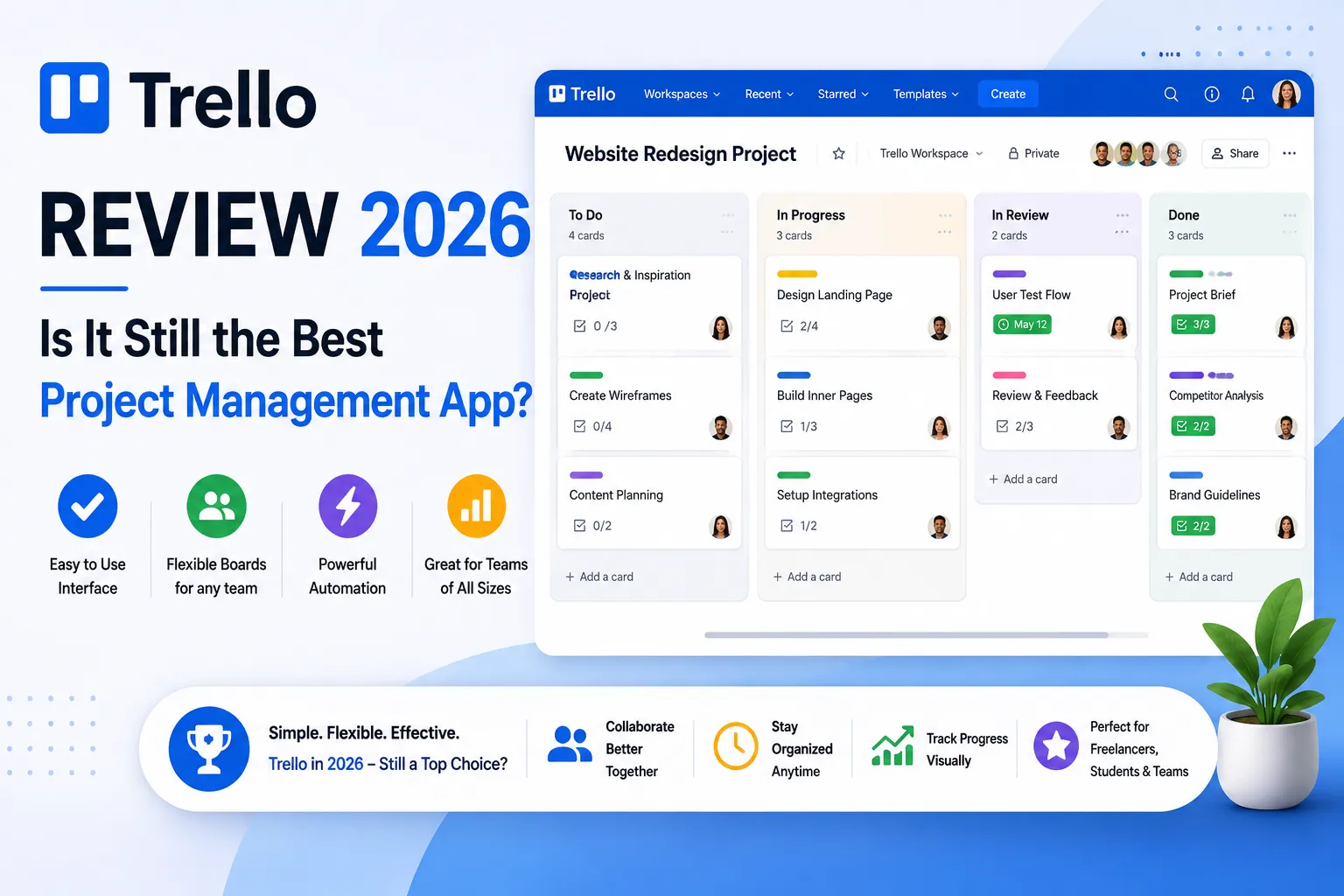
| In this Trello review, we found Trello to still be the easiest and most beginner-friendly project management tool in 2026. Its free plan is great for small teams, but advanced users may prefer ClickUp or Asana. |
Trello has been the world’s favourite Kanban board for years — but in 2026, with ClickUp, Asana, and Notion all competing hard, is Trello still worth using?
Honestly, I’ve been using Trello for over three years — for content calendars, client project tracking, and personal task management. This trello software review answers the question many teams are asking: has Trello kept up, or is it now just a nostalgia choice in a world of more powerful tools?
Furthermore, the review of trello in 2026 reveals a clear pattern: Trello is still outstanding for simple workflows and beats every competitor on ease of use and mobile experience. However, teams that have grown beyond basic Kanban boards consistently find themselves wanting features Trello doesn’t offer. Consequently, the right answer depends almost entirely on how complex your projects actually are.
1. What is Trello? — Quick Overview
| Trello is a visual Kanban-based project management tool owned by Atlassian. It organizes work into boards, lists, and cards — making it the simplest PM tool available in 2026. |
Trello was launched in 2011 and acquired by Atlassian in 2017. Additionally, it’s used by over 50 million people worldwide — making it one of the most recognized project management tools globally. The core concept is simple: boards represent projects, lists represent stages, and cards represent individual tasks.
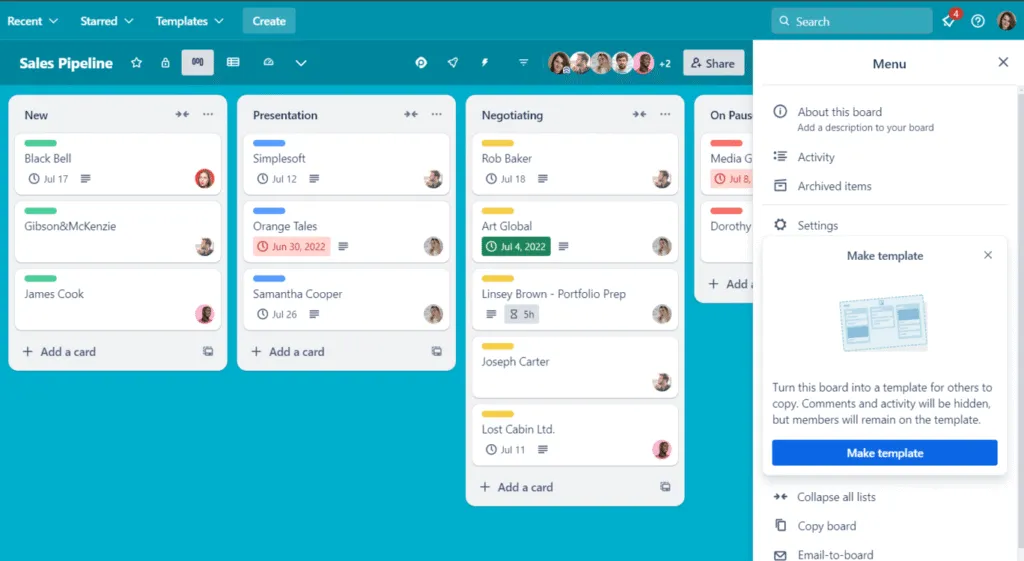
That simplicity is both Trello’s greatest strength and its primary limitation. Furthermore, Trello is part of the Atlassian ecosystem alongside Jira, Confluence, and Bitbucket — which means it integrates natively with these tools for software development teams who already use Atlassian products.
- Boards — one board per project or workflow
- Lists — columns representing stages (To Do, In Progress, Done)
- Cards — individual tasks with descriptions, attachments, checklists, due dates
- Power-Ups — integrations with Slack, Google Drive, Jira, and 200+ other tools
- Automation — Butler automation for repetitive tasks and workflows
- Views — Board, Timeline, Calendar, Dashboard, Table, Map (Premium)
2. Trello Review 2026 — My Honest Experience
| Trello is still the fastest tool to get started with in 2026. You can have a working board in under 5 minutes. However, for anything beyond simple task tracking, its limitations become frustrating quickly. |
When I first used Trello back in 2021, it was revelatory — a visual Kanban board that anyone could understand immediately. The trello review 2026 tells a slightly different story, however. Trello hasn’t changed dramatically, but the competition has improved significantly. Consequently, Trello now feels limited compared to ClickUp or Asana for anything beyond basic task lists.
That said, I still use Trello for specific workflows — particularly content calendars and simple client project tracking. Furthermore, for teams where not everyone is technically comfortable, Trello’s learning curve of approximately 10 minutes is unmatched. No other PM tool gets your whole team productive that fast.
Free vs Premium — Quick Comparison Table
| Feature | Free Plan | Premium Plan ($10/user/mo) |
| Workspace collaborators | Up to 10 | Unlimited |
| Boards per workspace | 10 boards max | Unlimited boards |
| Cards & Lists | Unlimited | Unlimited |
| Power-Ups | Unlimited (basic integrations) | Unlimited (all Power-Ups) |
| Automation runs | 250 commands/month | Unlimited automation |
| File attachments | 10MB per file | 250MB per file |
| Views | Board (Kanban) only | Board + Timeline + Calendar + Dashboard + Table + Map |
| Workspace admin controls | Basic only | Full admin + observer roles |
| Workspace views | ❌ Not available | ✅ Dashboard + Table views |
| Guest access | Single-board guests only | Observer + single-board guests |
| Priority support | ❌ Standard only | ✅ Priority support |
| Free trial | N/A | ✅ 14-day free trial |
| Best For | Solo users, tiny teams | Teams 5-100 needing views + automation |
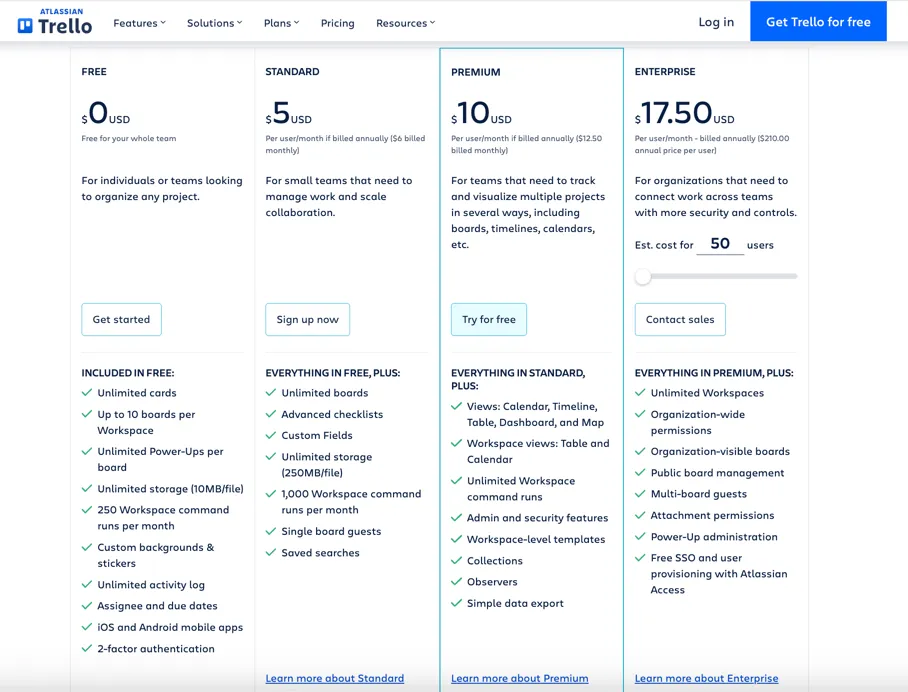
| 💡 In my experience: The Trello free plan is the best starting point for teams of 1-5 people who only need basic Kanban boards. The 10-board limit is the key constraint — most small teams hit it within 3-4 months. When you do, Standard at $5/user/month is genuinely the cheapest meaningful PM upgrade available anywhere. |
Comparing Trello with other PM options? Our guide to the best project management tools for small businesses in 2026 covers ClickUp, Asana, monday.com, Notion, Zoho Projects, and Trello side by side.
3. Trello Free Review — How Good Is the Free Plan?
| Trello’s free plan is the best simple Kanban PM free plan available. Unlimited cards, up to 10 collaborators per Workspace, unlimited Power-Ups, and 10 boards. The 10-board limit and 250 automation commands are the key constraints. |
The trello free review starts with a genuinely positive finding: Trello’s free plan improved significantly in 2022 when Atlassian made Power-Ups unlimited on all plans — including free. Consequently, you can connect Slack, Google Drive, Jira, and hundreds of other tools without paying anything.
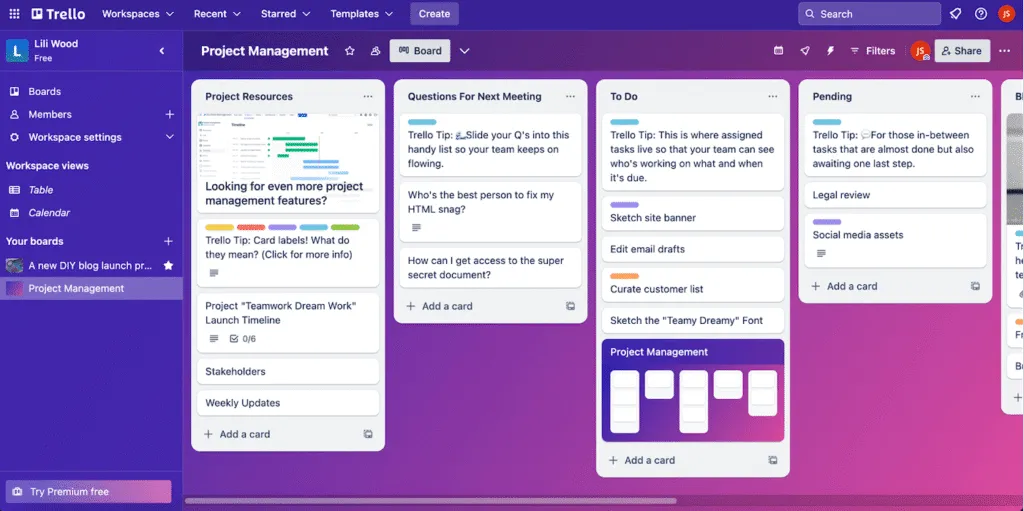
However, the 10-board limit is a real constraint for growing teams. Additionally, the free plan only includes the Kanban board view — no Timeline, Calendar, or Dashboard views. Therefore, if you need to see your projects as a Gantt chart or calendar, you must upgrade to Premium ($10/user/month).
- Unlimited cards and lists — no limits on task volume
- Up to 10 collaborators per Workspace — enough for most small teams
- Unlimited Power-Ups — connect any integration tool
- 10 boards per workspace — adequate for very small teams
- 250 automation commands/month — easy to exceed for active teams
- 10MB file attachment limit — PDFs and designs fill up fast
- Kanban view only — no Timeline, Calendar, or Dashboard
| Free plan verdict: Trello Free is excellent for 1-5 person teams running 5-8 active projects simultaneously. However, the moment you need more than 10 boards or want to see your work in a timeline or calendar view, you need Standard ($5/user/month) or Premium ($10/user/month). |
4. Trello Premium Review — Is the Paid Plan Worth It?
| Trello Premium at $10/user/month is worth it for teams that need Timeline views and unlimited automation. However, compared to ClickUp at $7/user/month — which offers more features — Trello Premium is slightly overpriced for what you get. |
The trello premium review centers on one question: is the jump from free or Standard worth $10/user/month? The honest answer is yes — but only for specific reasons. Premium’s biggest value-add is the views: Timeline (Gantt), Calendar, Dashboard, Table, and Map all unlock at Premium. Consequently, if your team needs visual project timeline planning, Premium is the minimum viable plan.
Additionally, Premium includes unlimited automation commands — a genuine upgrade from the 250/month limit on Free and 1,000/month on Standard. Furthermore, workspace admin controls, observer roles, and domain-restricted invites are only available on Premium. Therefore, teams that need governance and security controls alongside Kanban must be on Premium.
| Plan | Annual Price | Monthly Price | What You Get |
| Free | $0 forever | $0 | 10 boards, unlimited cards, 250 automation/mo |
| Standard | $5/user/mo annual | $6/user/mo monthly | Unlimited boards, custom fields, single-board guests |
| Premium ⭐ | $10/user/mo annual | $12.50/user/mo monthly | All views (Timeline/Calendar/Dashboard), unlimited automation |
| Enterprise | $17.50+/user/mo | Annual only | SSO, admin controls, unlimited workspaces |
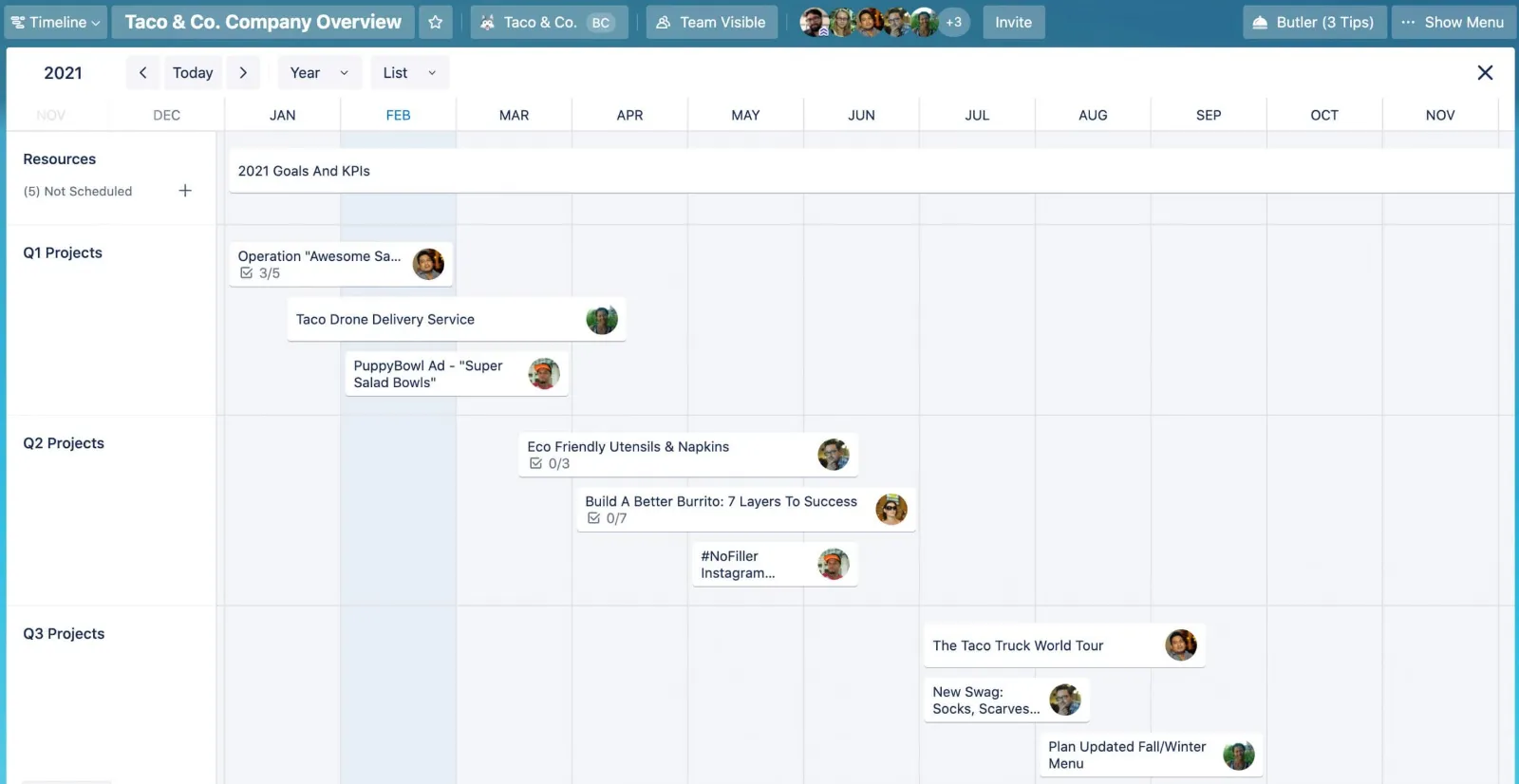
| My honest take: If you’re deciding between Trello Standard ($5) and Trello Premium ($10), the question is simple — do you need Timeline view or Dashboard reporting? If yes, Premium is worth it. If you just need unlimited boards and custom fields, Standard is the better value. Furthermore, if you need all those Premium features AND advanced task management, ClickUp at $7/user/month may be the smarter choice overall. |
5. Trello App Review — How Good Is the Mobile App?
| The Trello mobile app is the best project management app in 2026 — fast, intuitive, and fully functional on both iOS and Android. This is Trello’s single strongest competitive advantage over ClickUp and Asana on mobile. |
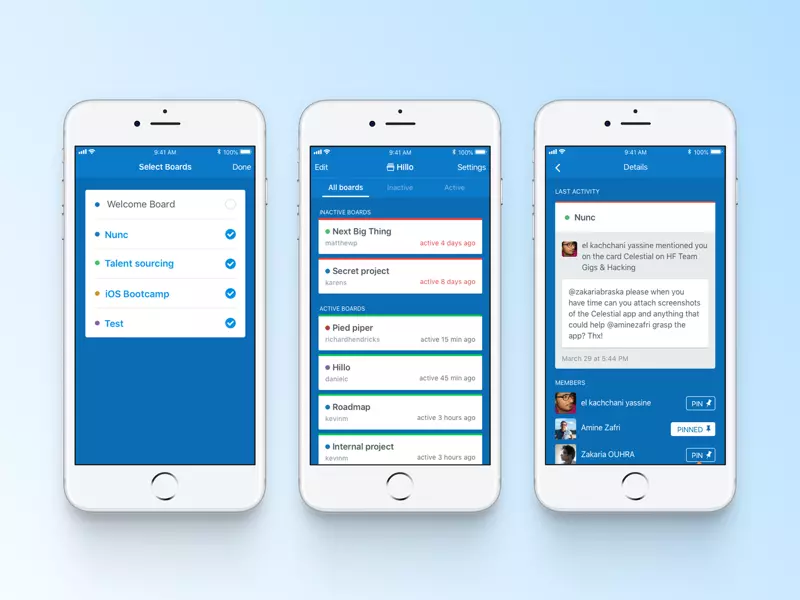
The trello app review is the most positive section of this entire post. Honestly, no other PM tool comes close to Trello’s mobile experience. The iOS and Android apps load instantly, card updates sync in real-time, and every core feature works exactly as it does on desktop — without the reduced functionality that plagues most PM mobile apps.
Furthermore, Trello’s mobile app supports offline mode — you can view and edit cards even without an internet connection, with changes syncing automatically when you reconnect. Consequently, for teams working in the field, travelling, or in areas with poor connectivity, Trello mobile is genuinely reliable in a way ClickUp and Asana are not.
- Instant load times — faster than any competing PM mobile app
- Full feature parity with desktop — nothing missing on mobile
- Offline mode — view and edit cards without internet
- Real-time sync — changes appear instantly across all devices
- iOS and Android — both consistently 4.8+ rated on app stores
- Quick card creation — add tasks in under 5 seconds from home screen
| In my experience: I’ve tested the Trello app on an older Android device alongside ClickUp and Asana. Trello loaded in under 2 seconds; ClickUp took 8 seconds; Asana took 5 seconds. For field teams or anyone using a mid-range device, that difference is noticeable every single day. |
6. Trello Project Management Review — Real Use Cases
| Trello excels for content calendars, client onboarding, simple sprint tracking, and personal task management. It struggles with complex multi-dependency projects and resource management. |
The trello project management review shows a clear pattern: Trello works brilliantly for visual, linear workflows where tasks move through defined stages. However, it falls short for complex project management with nested dependencies, resource allocation, or multi-team visibility needs.
Here are the use cases where Trello genuinely shines — and the ones where it doesn’t:
Where Trello Project Management Works Well
- ✅ Content calendar — editorial workflows with stages (Draft → Review → Published)
- ✅ Client onboarding — checklist-based processes with clear stages
- ✅ Bug tracking — simple cards with labels for priority and status
- ✅ Personal task management — daily to-do boards with simple priorities
- ✅ Event planning — task cards organized by phase and responsibility
- ✅ Sales pipeline — visual deal stages for small sales teams
Where Trello Struggles
- ❌ Complex dependencies — no native task dependency management on any plan
- ❌ Resource management — no workload view or capacity planning
- ❌ Advanced reporting — even Premium dashboard is basic vs ClickUp or Asana
- ⚠️ Large teams (50+) — boards become unwieldy, visibility across projects limited
- ⚠️ Time tracking — requires a paid Power-Up add-on, not built-in
Need more than Trello can offer? Our ClickUp vs Asana: Which One Should You Choose? comparison shows exactly which alternative fits different team types — with free plans, pricing, and a clear verdict.
7. Trello Pros and Cons — Honest Verdict
| Trello’s main strength is simplicity and mobile excellence. The main weakness is feature depth — it’s not built for complex project management needs. |
| ✅ PROS | ❌ CONS |
| ✅ Easiest PM tool to learn — productive in under 10 minutes | ❌ No task dependencies — can’t mark Task B as dependent on Task A |
| ✅ Best mobile app of any PM tool — fast, full-featured, offline mode | ❌ No built-in time tracking — requires paid Power-Up add-on |
| ✅ Free plan genuinely useful — up to 10 collaborators, unlimited cards and Power-Ups, 10 boards | ❌ Timeline/Calendar views locked behind Premium ($10/user/month) |
| ✅ Standard plan at $5/user/month — cheapest meaningful PM upgrade available | ❌ 250 automation commands/month on free — easy to exceed for active teams |
| ✅ Unlimited Power-Ups on all plans — connect any tool you already use | ❌ 10MB file limit on free plan — small for design or document-heavy teams |
| ✅ Clean, beautiful Kanban interface — teams enjoy using it daily | ❌ Reporting is basic — even Premium Dashboard lacks resource analytics |
| ✅ Atlassian ecosystem — native Jira, Confluence, Bitbucket integrations | ❌ Not ideal for large teams (50+) — visibility across boards limited |
| ✅ 250,000+ templates — community has built solutions for almost every workflow | ❌ No offline access on web — desktop app required for reliable offline use |
8. Trello Review Reddit — What Real Users Say
| Reddit users consistently praise Trello’s simplicity and mobile app, but frequently outgrow it. The most common pattern: teams start on Trello, love it, then switch to ClickUp or Asana when their project complexity increases. |
Looking at trello review reddit threads across r/projectmanagement, r/smallbusiness, and r/productivity, the pattern is consistent. Furthermore, positive reviews overwhelmingly come from content teams, freelancers, and small businesses running simple workflows — exactly Trello’s target audience.
However, the most common Reddit criticism is hitting the ceiling — teams love Trello until they try to do something it wasn’t designed for, like task dependencies or resource planning. Consequently, many Reddit posts are titled some variation of: ‘Outgrew Trello — what should I switch to?’
The recurring themes we saw across those threads (paraphrased, not direct quotes):
- Content teams and freelancers often keep Trello for content calendars because nothing is simpler to read at a glance.
- The mobile app is one of the most frequently praised parts of Trello.
- A common story: teams move to ClickUp or Asana once they grow past a handful of people or need task dependencies.
- Many small teams say the free plan covers what they need — though it is now capped at 10 collaborators per Workspace.
- Standard at $5/user/month comes up often as the best-value paid upgrade.
10. Final Verdict — Our Trello Review Rating
| Category | Rating | Score |
| Free Plan Value | ★★★★☆ Best simple PM free plan | 4.3 / 5 |
| Ease of Use | ★★★★★ Easiest PM tool to learn | 5.0 / 5 |
| Kanban Board | ★★★★★ Industry-leading Kanban UX | 5.0 / 5 |
| Feature Depth | ★★★☆☆ Limited for complex projects | 3.0 / 5 |
| Mobile App | ★★★★★ Best PM mobile app in 2026 | 4.8 / 5 |
| Pricing Fairness | ★★★★★ Most affordable PM tool | 4.7 / 5 |
| Power-Ups | ★★★★☆ Unlimited on all plans | 4.5 / 5 |
| OVERALL | ★★★★☆ Recommended for simple teams | 4.2 / 5 |
After three years of using Trello and three weeks of comparative testing in 2026, my conclusion is clear: Trello is still the best Kanban tool available — for teams that only need Kanban. Furthermore, the free plan is genuinely excellent, the mobile app has no equal, and Standard at $5/user/month is the cheapest meaningful PM upgrade in the market.
However, be honest about your project complexity. If your team needs task dependencies, time tracking, or resource management — those features don’t exist in Trello at any price. Consequently, paying for Trello Premium when you need those capabilities is paying for the wrong tool. Additionally, ClickUp at $7/user/month offers more total features if you’re budget-conscious and need depth.
Therefore, my recommendation: if your workflows are visual and linear, start with Trello Free today. It will take you 10 minutes to set up and your team will adopt it immediately. If you hit the 10-board limit or need Timeline views, upgrade to Standard or Premium. And if you ever find yourself frustrated by what Trello can’t do — that’s the signal to evaluate ClickUp or Asana.
Final Trello Review Rating: 4.2 / 5
- ✅ Best plan to start: Trello Free — 10 boards, up to 10 collaborators, zero cost
- ✅ Best value paid plan: Standard at $5/user/month — cheapest PM upgrade
- ✅ Best for power users: Premium at $10/user/month for Timeline + unlimited automation
- ✅ Best mobile app: Trello wins this category in 2026 — no question
👉 Start free at trello.com — set up your first board in 10 minutes
| 💬 Was This Trello Review Helpful? Drop a comment below — are you using Trello or thinking of switching to ClickUp or Asana?Share this review with a teammate who’s been wondering whether Trello is still worth it in 2026. 👇 |
Still deciding between Trello and other PM tools? Our guide on how to choose project management software walks you through a 5-question framework that helps you identify the right tool based on team size, budget, and project complexity.
Freelancer evaluating Trello? Our guide to the best project management tools for freelancers in 2026 covers Trello, Paymo, ClickUp, Notion, and Zoho Projects specifically for solo workers and small freelance teams.