Category: Business Tools → Project Management
| ClickUp Best for: Power users, agencies$7/user/mo • 1,000+ integrations | Asana Best for: Beginners, teams$10.99/user/mo • 400+ integrations |
The Short Answer: It Depends on What You Value More
ClickUp and Asana are both excellent project management tools — but they’re built for different types of people. If you want maximum features at the lowest price and don’t mind a learning curve, ClickUp is your tool. If you want something clean, simple, and ready to use in under an hour, Asana will feel like home from day one.
Both tools have been around long enough to be battle-tested. Both have millions of users. And both have free plans that are genuinely usable — not just demos. The question is which one fits how you and your team actually work.
We’ve compared them across every category that matters for small businesses and growing teams — pricing, features, ease of use, free plan quality, and real-world use cases. If you want to explore more options before deciding, check out our guide to the best project management tools for small businesses in 2026
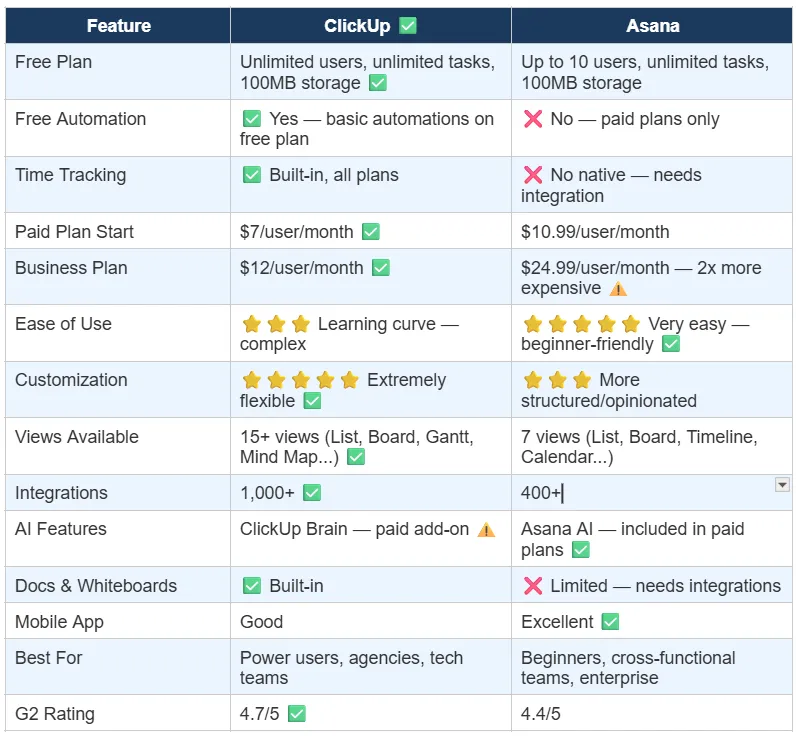
Free Plan & Paid Plan : ClickUp is More Generous
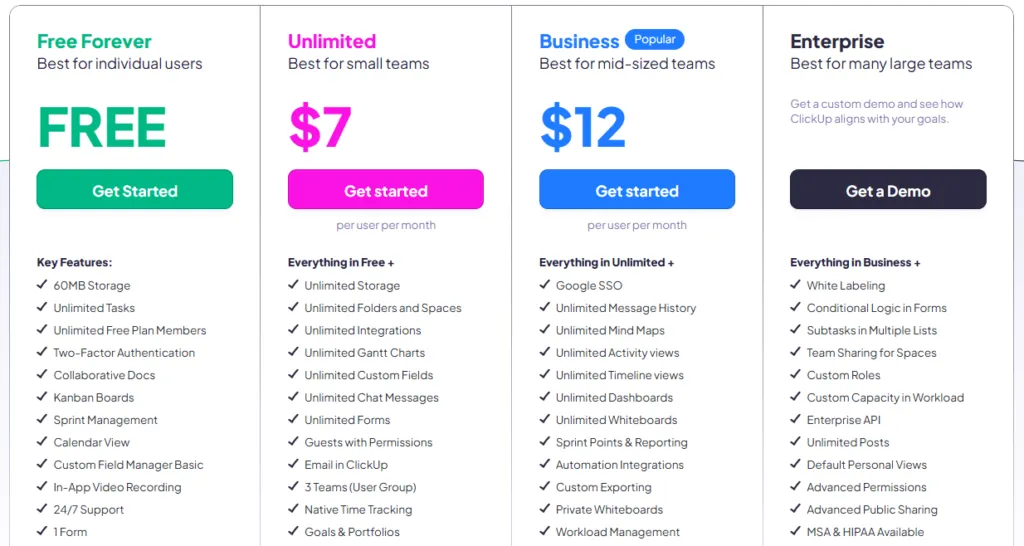
| 💡 Verdict: ClickUp wins the free plan comparison — especially for teams larger than 10 people or anyone who needs time tracking and basic automation without paying. |
ClickUp vs Asana: Full Feature Comparison at a Glance
Pricing: ClickUp is Significantly Cheaper at Every Tier
This is where the difference between the two tools becomes most obvious — and most financially significant. ClickUp consistently undercuts Asana’s pricing at every single plan level.
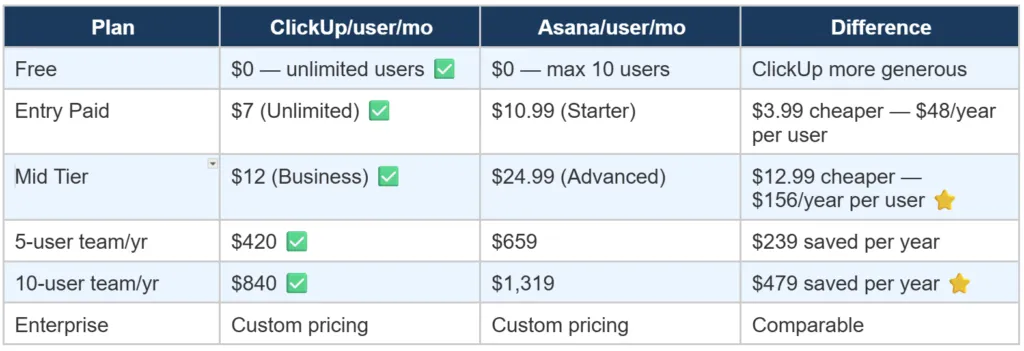
The most striking difference is at the mid tier. ClickUp’s Business plan ($12/user/month) goes head-to-head with Asana’s Advanced plan ($24.99/user/month) — and gives you comparable features at literally half the price. For a 10-person team on annual billing, that’s nearly $500 saved every year for essentially the same functionality.
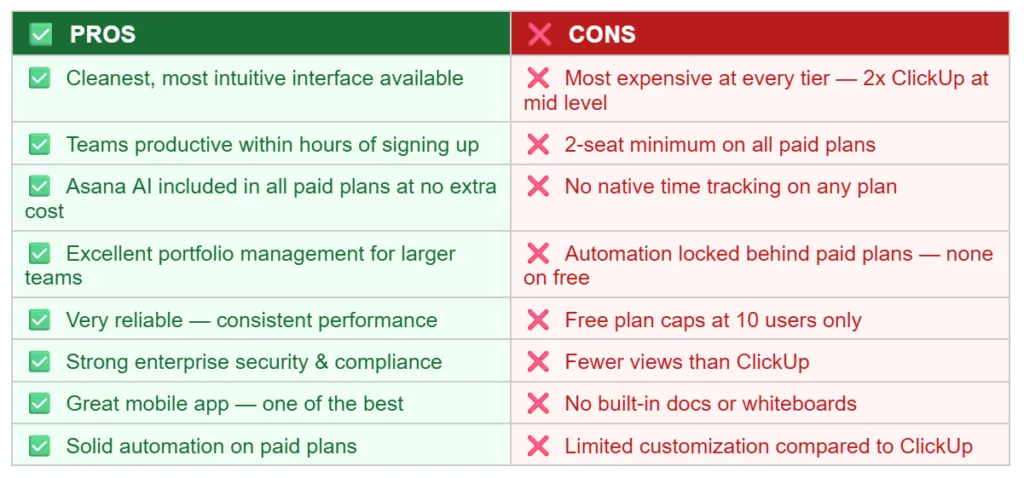
One important note about Asana’s pricing model: all paid plans require a minimum of 2 seats. This means the entry price is always at least $21.98/month on Starter — you can’t pay for just one seat even if you’re a solo user. ClickUp has no such minimum.
| ⚠️ Asana pricing trap: Two-seat minimum means even solo users pay for 2 seats. A freelancer or solo business owner will pay $21.98/month minimum just to access paid features — while ClickUp charges $7/month for one user. |
Ease of Use: Asana Wins — It’s Noticeably Simpler
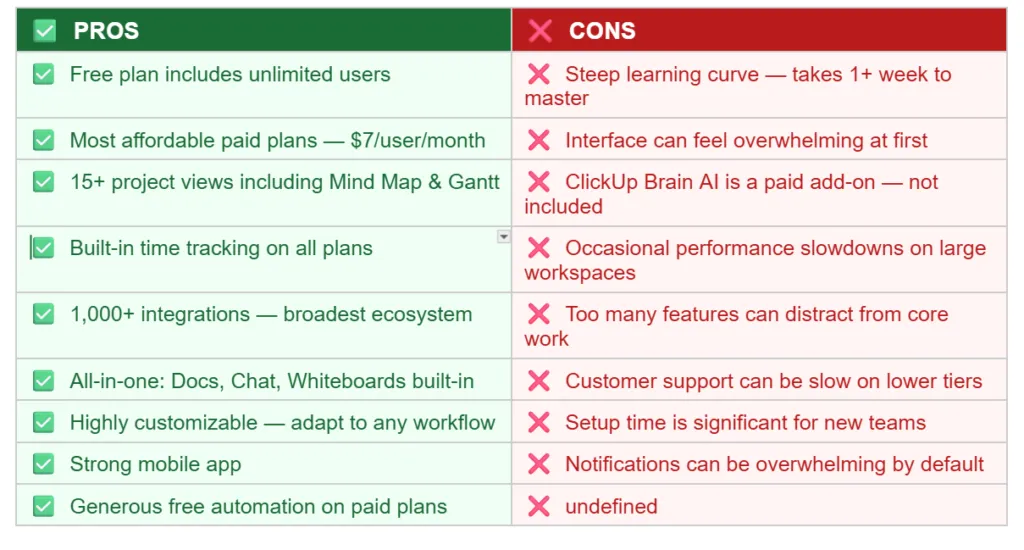
Let’s be honest about ClickUp: it’s powerful, but it’s not easy. When you first open ClickUp, you’re met with a workspace, spaces, folders, lists, tasks, and subtasks — all nested inside each other. New users typically spend a week just figuring out where everything is. The interface is packed with options, and finding the right setting takes time.
Asana, on the other hand, is clean. You can create a project, add tasks, assign them to team members, and set due dates within minutes of signing up — no training needed. The interface is calm, focused, and predictable. For non-technical team members, cross-functional teams, or businesses where multiple people need to adopt the tool quickly, Asana’s simplicity is a genuine competitive advantage.
If you’re a solo user, a freelancer, or a small team that just wants to get organized without configuring everything from scratch, Asana will get you productive in hours. ClickUp will get you productive eventually — but there’s a setup cost in time and mental energy first.
| ✅ Verdict: Asana wins ease of use clearly. Most teams are fully productive within hours. ClickUp’s learning curve is real — expect at least a week of setup before it feels natural. |
Features: ClickUp Has More — Almost Too Much
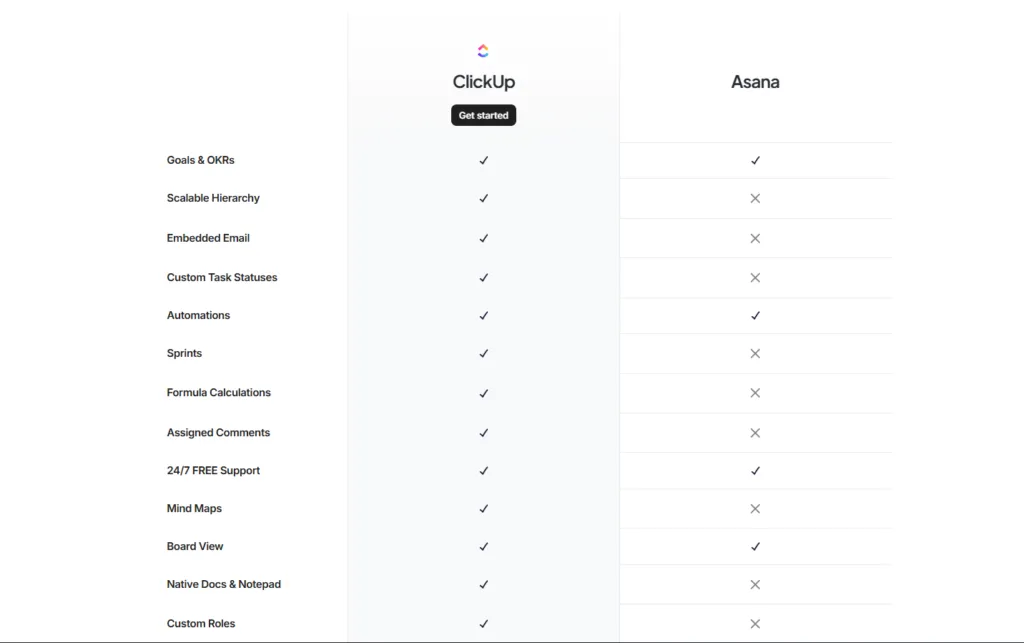
ClickUp’s selling point is that it can replace multiple tools. Need docs? ClickUp has docs. Need a whiteboard? ClickUp has whiteboards. Need time tracking? Built in. Need goals? Built in. Chat? Built in. Mind maps? Built in. The list goes on.
This ‘all-in-one’ approach is genuinely useful if you’re consolidating tools to save money. A small agency paying separately for Notion (docs), Clockify (time tracking), and Miro (whiteboards) could replace all three with ClickUp and save money every month.
Asana takes the opposite approach: do project management exceptionally well, and let other tools handle everything else. The result is a tool that’s best-in-class at organizing tasks, managing deadlines, and tracking project progress — but you’ll still need other tools for time tracking, docs, and chat.
- ClickUp unique features: Time tracking, Docs, Whiteboards, Mind Maps, Goals, Chat, 15+ views, ClickUp AI Brain
- Asana unique features: Strategy Maps, Advanced portfolio management, cleaner automations UI, Asana AI (included free in paid plans)
| 💡 Verdict: ClickUp wins on feature quantity. Asana wins on feature quality and usability. For teams who want one tool to replace many, ClickUp is the answer. For teams who want the best project management tool period, Asana competes strongly. |
ClickUp: Pros and Cons
Asana: Pros and Cons
Who Should Choose ClickUp vs Asana?
| ✅ Choose ClickUp if you…• Are a freelancer or agency managing multiple client projects• Need time tracking built into your PM tool — no extra app• Have a team larger than 10 people on a tight budget• Want to replace multiple tools (Notion + Slack + Trello) with one app• Are tech-savvy and don’t mind a learning curve• Need extensive customization — custom statuses, views, workflows• Want the most features at the lowest price point |
| ✅ Choose Asana if you…• Are a complete beginner and want to get organized today — not next week• Work in a cross-functional team with non-technical members• Need a clean, focused tool without feature overload• Work in enterprise environments where compliance matters• Want AI features included without paying extra• Need solid portfolio management across multiple projects• Prefer a tool that just works without extensive configuration |
How Do ClickUp and Asana Compare to Other PM Tools?
ClickUp and Asana are two of the best project management tools available — but they’re not the only options. There are 5 other strong contenders worth knowing about before you make a final decision.
Our full guide on the top 7 best project management tools for small businesses in 2026 covers monday.com, Trello, Notion, Zoho Projects, and more — with complete pricing breakdowns and a final verdict for every type of business.
FAQs — ClickUp vs Asana 2026
Final Verdict: Our Recommendation for 2026
Both ClickUp and Asana are excellent tools — and both have millions of satisfied users for good reason. There’s no objectively ‘wrong’ choice here. But there is a right choice for your specific situation.
Choose ClickUp if you want maximum value for money, need time tracking built in, have a team larger than 10 people, or want to consolidate multiple tools into one platform. The learning curve is real but worth it once you’re set up.
Choose Asana if you want to be up and running in under an hour, work with non-technical team members, or need clean portfolio management for multiple projects. Yes, it costs more — but for teams where adoption speed matters, the simplicity premium is worth paying.
| 🏆 Our Pick for Small Businesses: ClickUp — better free plan, lower paid pricing, built-in time tracking, and enough features to replace 3-4 separate tools. Start with the free plan at clickup.com — no credit card required. |
Before you decide, also check out our complete guide to the best project management tools for small businesses — covering monday.com, Trello, Notion, Zoho Projects and more in one place. It might help you find an option you hadn’t considered.
🔍 How We Tested This Tool
Every tool on Tool Growth is tested hands-on using real accounts — not marketing materials. We follow an 8-step review process before publishing.
Written by Aqib Khushk | Tool Growth | toolgrowth.com | March 2026
Category: Business Tools→ Project Management | Tags: ClickUp, Asana, Comparison, Project Management, Small Business