Still managing your customers in a spreadsheet? Or worse — in your head? In this guide, we’ll explain what is CRM software and how it can help you manage customers more effectively.
Honestly, I was there too. For the first year of running Tool Growth, I kept client details in a Google Sheet that I updated maybe once a week. Consequently, I forgot follow-ups, mixed up client details, and lost track of who was at what stage of a conversation. As a result, I missed opportunities that I didn’t even know I was missing.
That’s exactly the problem CRM software solves. Furthermore, it’s simpler to understand — and to start using — than most people think. Therefore, this guide breaks down what CRM software is, who needs it, and how to start for free today.
What is CRM Software? — Meaning & Definition
| ⚡ Quick Answer CRM (Customer Relationship Management) software is a digital system that stores and manages all your customer information in one place — so your team always knows who each customer is, what they need, and what to do next. |
In simple words: CRM software is a smarter, more powerful replacement for your customer spreadsheet. Additionally, it automates tasks, tracks conversations, and helps you close more deals — all from one dashboard.
| 📌 Official definition from HubSpot: ‘CRM software is a powerful tool that helps businesses organize and manage their customer relationships on a centralized and easy-to-use platform. By tracking leads and building a full database of customer activity, businesses have clear insight into where they stand with every customer and prospect.’ |
What is CRM Software Used For? — Simple Explanation
Think of CRM software as a smart digital notebook — but instead of just storing names and phone numbers, it tracks every interaction you’ve ever had with a customer. Moreover, it reminds you when to follow up, shows you where each deal is in your sales process, and gives your whole team a shared view of every customer relationship.
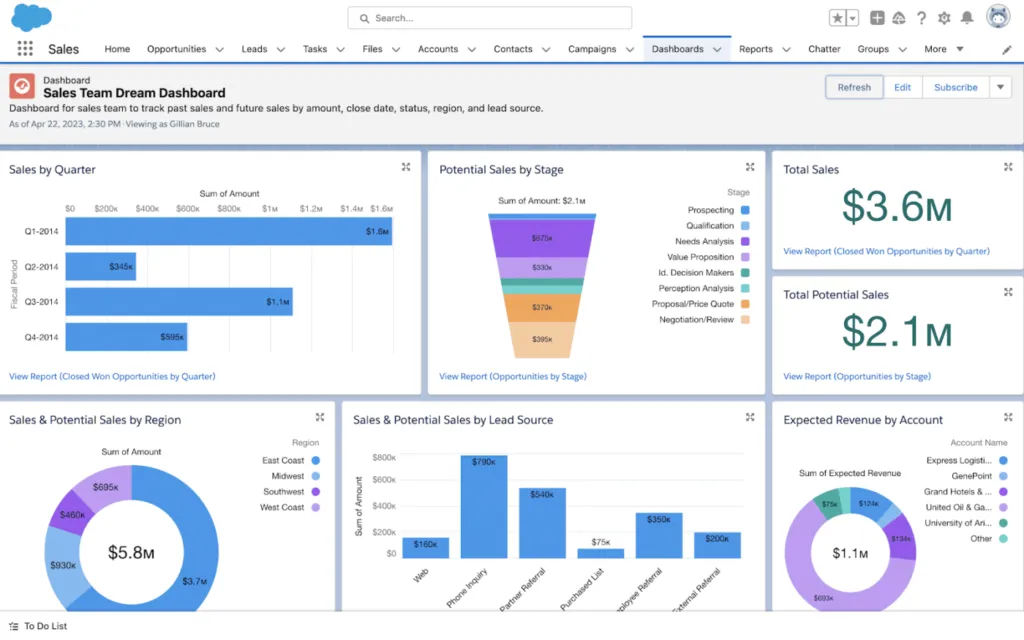
According to HubSpot, the main functions of a CRM system are to: consolidate and manage customer data, streamline the sales process by tracking leads and activities, increase collaboration between sales, marketing, and service teams, and track and report on key business insights. As a result, everyone on your team — not just the salesperson — has the same up-to-date information about every customer.
Furthermore, Salesforce describes CRM as helping companies ‘build customer relationships, be more productive, and increase efficiency’ by giving employees a single, holistic view of every interaction across every department. Consequently, your customer stops feeling like they’re talking to strangers every time they contact your business.
| In my experience: The biggest thing CRM gave me wasn’t fancy features — it was simply knowing, at any moment, exactly what I last said to a client and what I promised to do next. That alone was worth switching from spreadsheets. |
What is CRM Software and How Does It Work? — 5 Key Features
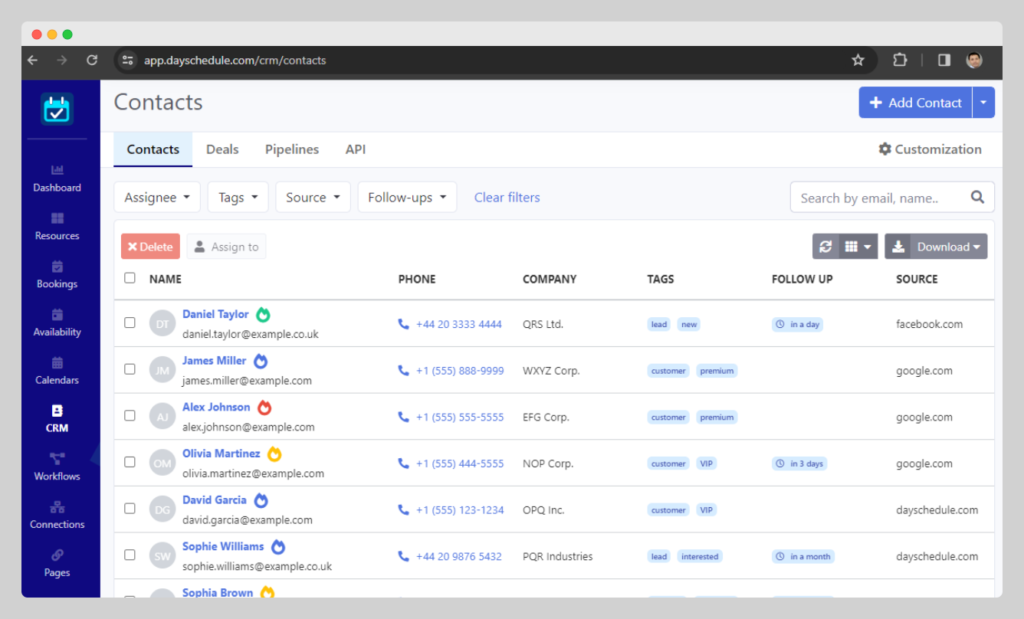
Here are the five core features every CRM software includes — based on verified information from HubSpot and Salesforce:
Feature 1 — Contact Management
This is the foundation. CRM software stores every customer’s name, email, phone number, company, and communication history in one organized contact record. Furthermore, tools like HubSpot automatically enrich contact records with company details from their database of over 20 million businesses. As a result, you always have a complete picture of who you’re dealing with before you pick up the phone.
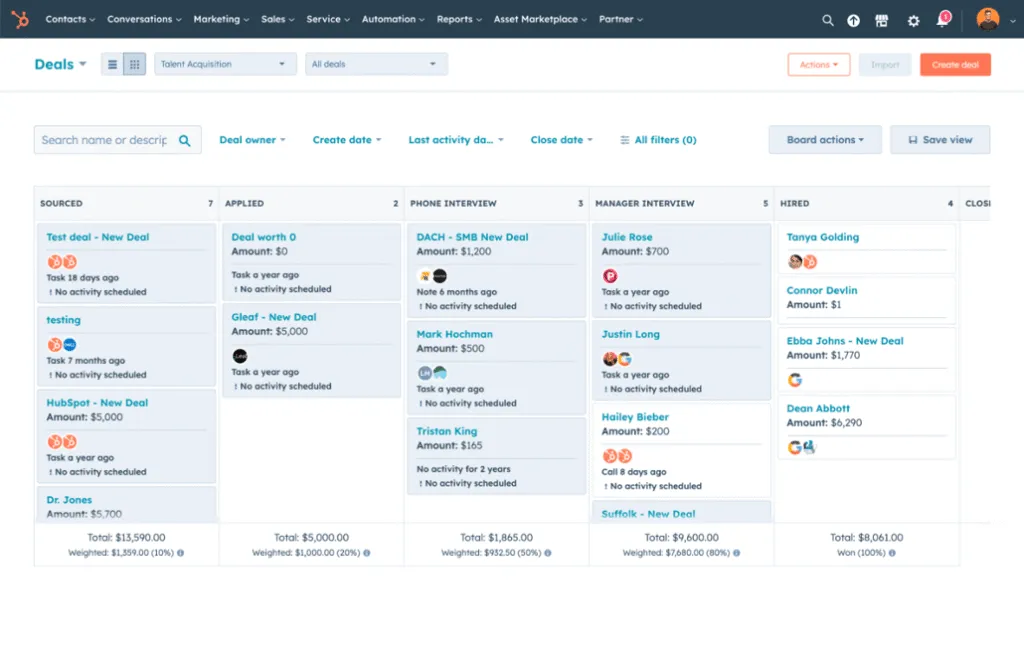
Feature 2 — Deal Pipeline Management
A pipeline view shows you every active deal at every stage of your sales process — from first contact to closed deal. Consequently, you can instantly see which deals need attention, which are close to closing, and which have gone cold. According to HubSpot, pipeline management lets you ‘visualize your entire sales cycle, assign tasks, and predict future revenue based on how likely deals and clients will close.’
Feature 3 — Email Tracking and Templates
CRM software tracks when prospects open your emails and click your links. Therefore, you know exactly when to follow up — right when a prospect is actively thinking about you. Additionally, HubSpot’s free CRM includes email templates so your team can share winning email scripts and consistently send professional outreach without rewriting from scratch each time.
Feature 4 — Task and Activity Tracking
Every call you make, email you send, and meeting you schedule gets logged automatically inside the customer’s record. As a result, even if a different team member handles a customer tomorrow, they have the full history of every interaction at their fingertips. Furthermore, HubSpot describes this as giving ‘your teams the context they need’ to create personalized customer experiences.
Feature 5 — Reporting and Analytics
CRM software shows you exactly how your business is performing — how many deals are in the pipeline, what your close rate is, which marketing campaigns are generating leads, and how your team is performing. Moreover, according to Salesforce, CRM turns ‘data into context and workflows into intelligence.’ Therefore, instead of guessing what’s working, you have actual numbers to guide your decisions.
CRM Software Examples — Who Uses It and Why
According to HubSpot, ‘businesses of all sizes can benefit from CRM software — from small businesses to growing startups to large enterprises.’ However, that doesn’t mean everyone needs it right now. Therefore, here’s a simple way to decide:
- ✅You have more than 20-30 active customers or leads — spreadsheets stop working here
- ✅Your team misses follow-ups because information is scattered across email and WhatsApp
- ✅Multiple people need to access the same customer information
- ✅ You want to track which marketing activities are actually bringing in customers
- ✅ You’re growing and need your sales process to be repeatable, not dependent on memory
- ❌ You have only 5-10 customers and personally know each one well — a spreadsheet is still fine for now
- ❌ You’re pre-launch with no customers yet — wait until you have real data to manage
| Salesforce puts it well: ‘Running a small business is no easy task, but finding the right CRM can make a big difference.’ The question isn’t whether CRM will eventually help you — it’s whether you need it today. Consequently, start when managing customer relationships manually starts costing you time or opportunities. |
Ready to start using CRM? Furthermore, our guide to the best CRM tools for small businesses in 2026 compares HubSpot, Zoho, Brevo, Pipedrive, and Freshsales — with pricing, pros/cons, and a clear verdict for each team type.
What Does CRM Software Stand For? + Free vs Paid Options
The good news is that free CRM software has become genuinely powerful in 2026. Nevertheless, there are real differences between free and paid plans that affect how far you can grow. Here’s the honest comparison — based on verified data from HubSpot’s official pricing page:
| Feature | Free CRM | Paid CRM |
| Contact Management | ✅ Yes — basic records | ✅ Yes — advanced + auto-enrichment |
| Deal Pipeline | ✅ Basic pipeline view | ✅ Advanced with forecasting |
| Email Tracking | ✅ Limited notifications | ✅ Full tracking + templates |
| Automation | ❌ Very limited or none | ✅ Workflow automation included |
| Reporting | ✅ Basic dashboard only | ✅ Custom reports + AI insights |
| AI Features | ⚠️ Basic AI tools only | ✅ Advanced AI agents + analysis |
| Integrations | ✅ Limited (200-300 apps) | ✅ 2,000+ apps + custom APIs |
| Number of Users | Limited (2 users on HubSpot Free) | Unlimited or per plan |
| Contacts Limit | 1,000 (HubSpot Free) | Up to 15 million on paid |
| Best For | Startups, solopreneurs, testing CRM | Growing teams, scaling businesses |
Based on the data above, free CRM software is completely sufficient if you’re just starting out, have a small contact list (under 1,000), and don’t need complex automation yet. However, as your business grows and your team expands, paid plans become necessary — specifically for automation, advanced reporting, and removing platform branding from your customer-facing tools.
Moreover, HubSpot makes a practical point about upgrading: ‘Simply upgrade your free account to get advanced CRM capabilities whenever you’re ready. No disruption, no data migration.’ Therefore, starting free is genuinely a safe choice — you won’t lose your data or need to start over when you’re ready to pay.
Best CRM Software Examples in 2026 — Where to Start Free
Based on verified official information, here are the two best free CRM starting points for small businesses:
HubSpot CRM Free — Best Overall Free Starting Point
According to HubSpot’s official website, the free CRM plan includes contact management, deal pipelines, a reporting dashboard, email tracking, meeting scheduler, live chat, AI content writer, and CRM import — all at zero cost, with no expiration date. Furthermore, HubSpot confirms: ‘With up to two users, 1,000 contacts, and no limits on customer data, HubSpot’s free CRM functionality is 100% free, with no expiration date.’
Additionally, HubSpot’s free plan connects to over 2,000 popular business apps through their marketplace. Consequently, even on the free tier, your CRM works with the tools you already use. The platform is browser-based — no downloads or installations required — and works with Chrome, Firefox, Safari, or Edge.
- ✅ Contact management + deal pipelines + reporting — all free
- ✅ Email tracking, meeting scheduler, live chat — all free
- ✅ AI writing assistant and Breeze AI tools — included free
- ⚠️ 2 users maximum on free plan
- ⚠️ 1,000 contacts maximum on free plan
- ❌ Automation requires Starter plan ($15/month/seat)
Comparing all free CRM options? Moreover, our guide to the best free CRM for small businesses covers HubSpot, Zoho, Brevo, Freshsales, and Bitrix24 — with an honest verdict on which free plan actually works long-term.
Brevo — Best Free CRM Combined With Email Marketing
Brevo is different from HubSpot in one important way: it combines email marketing and CRM in a single platform. Therefore, if your small business needs to manage customer relationships AND send regular email campaigns, Brevo lets you do both without paying for two separate tools.
Brevo’s free plan includes unlimited contact storage, a basic deal pipeline, and email marketing with up to 300 emails per day — all free. Consequently, it’s particularly strong for solo founders and small businesses that can’t justify paying for both a CRM and an email marketing tool separately.
Want the full picture on Brevo? Our Brevo review 2026 covers exactly what you get on the free plan, including the CRM features, email deliverability, and an honest rating of whether upgrading is worth it.
Final Verdict — Should You Use CRM Software?
After two years of managing Tool Growth — first without a CRM, then with one — my verdict is clear: CRM software is not optional once your business has more than a handful of active customers. The question is simply when to start, not whether to start.
Furthermore, the barrier to entry has never been lower. HubSpot’s free CRM gives you contact management, deal pipelines, email tracking, and AI tools at zero cost. Brevo adds email marketing to the mix for free. Consequently, there’s no financial reason to delay getting organized.
Therefore, my recommendation is this: if you have more than 20 active customers or leads right now, sign up for HubSpot Free today. It takes less than 30 minutes to set up and immediately gives you a cleaner picture of your business than any spreadsheet ever could. Start simple, use it consistently for 30 days, and you’ll understand exactly which paid features — if any — are worth adding next.
| ✅ Summary — What is CRM Software?• It’s a digital system to manage all your customer relationships in one place• Main features: Contact management, deal pipeline, email tracking, task tracking, reporting• Best starting point: HubSpot Free (most complete free plan) or Brevo Free (email + CRM combined)• Who needs it: Any business with 20+ active customers or leads• Cost to start: $0 — free plans from HubSpot and Brevo are genuinely useful |
| 💬 Found This Guide Helpful? Drop a comment below — tell us what you’re currently using to manage your customers.And if this guide saved you time, share it with a fellow business owner who’s still using spreadsheets. 👉 Next step: Start with HubSpot Free — takes 30 minutes, no credit card required. |
🔍 How We Tested This Tool
Every tool on Tool Growth is tested hands-on using real accounts — not marketing materials. We follow an 8-step review process before publishing.