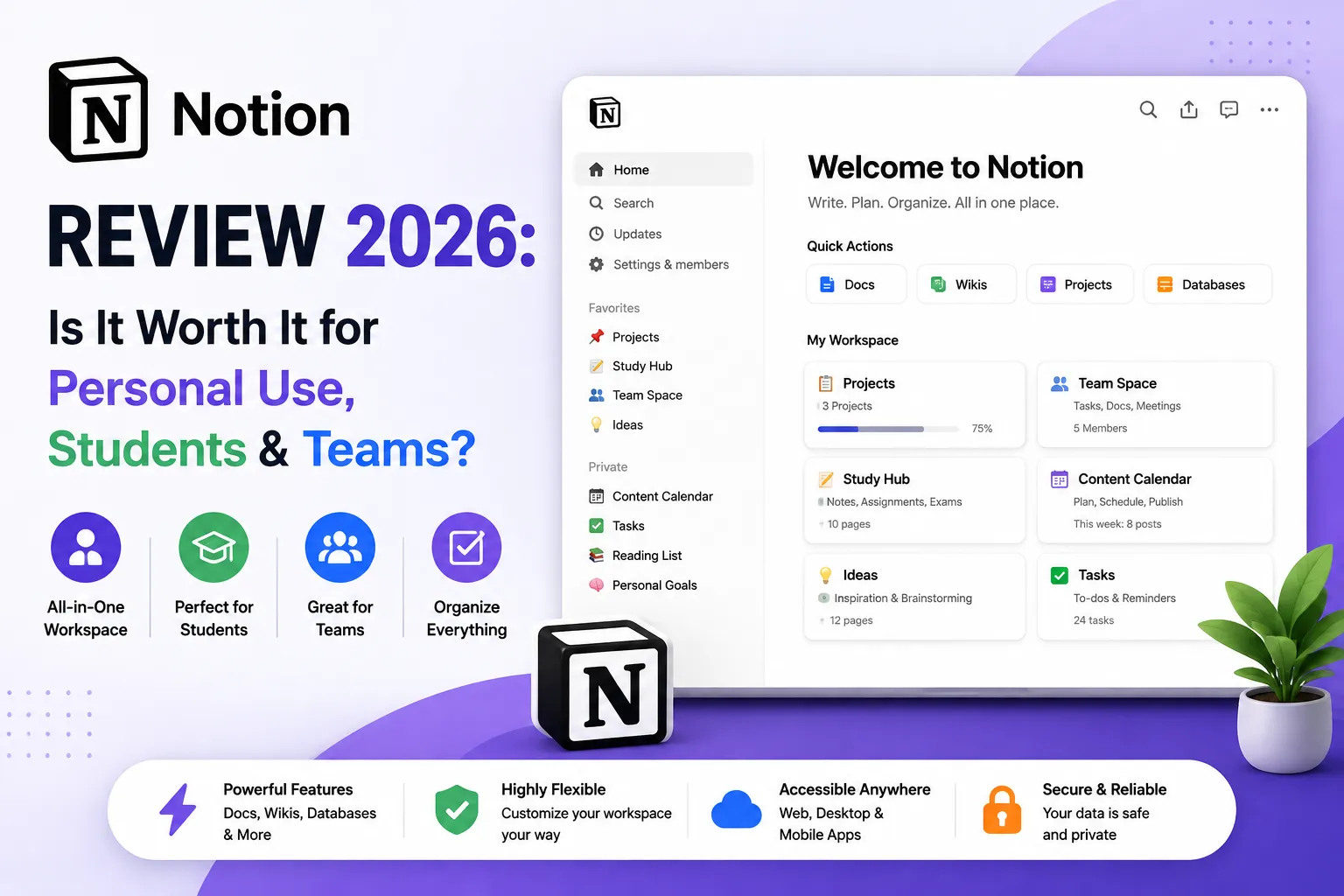
| This Notion review is based on real daily use over the past 18 months. Overall, Notion remains the most flexible all-in-one workspace available in 2026. The free plan is outstanding for students and personal use. Notion AI ($8/month add-on) is genuinely useful but not essential. Notion Mail and Notion Calendar are promising but still maturing. For teams and businesses, Notion pairs best with a dedicated task manager — don’t try to replace ClickUp or Asana with it. Best For: Students, personal users, content teams, remote teams | Free Plan: Yes | Paid From: $8/user/mo |
Is Notion really the one app that can replace your notes, docs, wiki, calendar, and email — or is it just another productivity tool that promises too much?
Honestly, I’ve been using Notion for over 18 months — for blog planning, client documentation, and team knowledge bases. This notion software review is based on real daily use, not a quick demo. The review of notion from most sites misses the practical truth: Notion is extraordinarily powerful but only if you’re willing to invest time in setting it up properly.
Furthermore, Notion has expanded significantly in 2026 — adding Notion AI, Notion Mail, and Notion Calendar to the platform. Consequently, this notion review 2026 covers all three new features, the free plan changes, and a clear verdict for students, personal users, and business teams.
What is Notion? — Quick Overview
Notion was launched in 2016 and has grown to over 100 million users worldwide. Additionally, it’s unique because everything in Notion is a ‘block’ — text, images, databases, checklists, and more — that can be combined and arranged however you need.
The result is a platform that works as a personal journal, team wiki, project tracker, CRM lite, content calendar, or study organizer — all without switching apps. However, that flexibility is also what makes Notion intimidating for new users. There’s no single ‘correct’ way to set it up, which means you need to invest time in building your system.
- Notes & Docs — rich text editor with unlimited pages
- Databases — tables, boards, galleries, calendars, timelines
- Notion AI — writing assistant, summarizer, Q&A on your workspace
- Notion Calendar — standalone calendar app with Notion integration
- Notion Mail — Gmail integration built into Notion (2026 beta)
- Templates — thousands of community and official templates
Notion Review 2026 — My Honest Experience
| Notion is the best free note-taking and documentation app available. However, it takes 1-2 weeks to set up properly, and the learning curve is steeper than Google Docs or Evernote. |
When I first tried Notion, I nearly quit after three days. The blank page felt overwhelming — no obvious structure, no guided workflow, just endless possibility. Consequently, my first Notion workspace was a cluttered mess for about two weeks before I found a template system that worked.
After that initial friction, however, Notion became indispensable. Furthermore, having my blog editorial calendar, client briefs, research notes, and SOPs all in one linked workspace genuinely changed how I organize work. Nothing else I’ve tried matches that level of connected, flexible documentation.
Free vs Paid — Quick Comparison Table
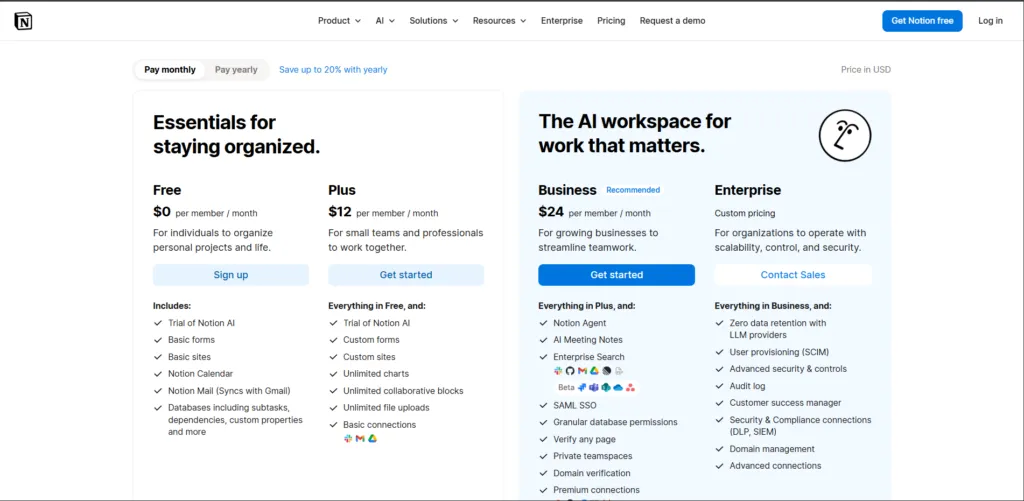
| Feature | Free Plan | Plus Plan ($8/user/mo annual) |
| Pages & Blocks | Unlimited (solo only) | Unlimited (teams) |
| File Uploads | 5MB per file | Unlimited file uploads |
| Guests | Up to 10 guests | Up to 100 guests |
| Page History | 7 days only | 30 days version history |
| Notion AI | Limited trial responses | AI add-on available ($8/mo) |
| Team Collaboration | Block limits apply | No block limits for teams |
| Private Teamspaces | ❌ Not available | ✅ Available |
| Notion Calendar | ✅ Included | ✅ Included |
| Notion Mail | ✅ Gmail sync (beta) | ✅ Gmail sync |
| Templates | Community templates | All templates + custom |
| Best For | Students, personal use | Small teams, freelancers |
| 💡 In my experience: The Notion free plan covers 90% of what students and solo users need. The main reason to upgrade to Plus ($8/user/month annual) is team collaboration — specifically the block limits that apply to teams on the free plan. For individual use, free is genuinely enough long-term. |
Notion works best as part of a complete productivity stack. Our guide to the best productivity tools for small businesses in 2026 covers how Notion pairs with ClickUp, Slack, Loom, and other tools for maximum efficiency.
Notion AI Review — Is the AI Feature Worth It?
Notion AI is genuinely useful — especially for summarizing long pages, drafting content, and querying your workspace. However, at $8/month as a paid add-on, it’s only worth paying for if you use Notion heavily every day.
The notion ai review starts with an important clarification: Notion AI is NOT included in any plan for free beyond an initial trial. It’s a $8/user/month add-on on top of your existing plan. Consequently, a Plus plan user pays $8 + $8 = $16/user/month if they want AI features.
That said, the AI functionality in 2026 is impressive. Additionally, Notion AI uses GPT-4.1 and Claude 3.7 Sonnet — the same models powering major AI products — integrated directly into your workspace context. Therefore, you can ask ‘summarize last week’s meeting notes’ and get an answer that references your actual Notion content, not generic AI responses.
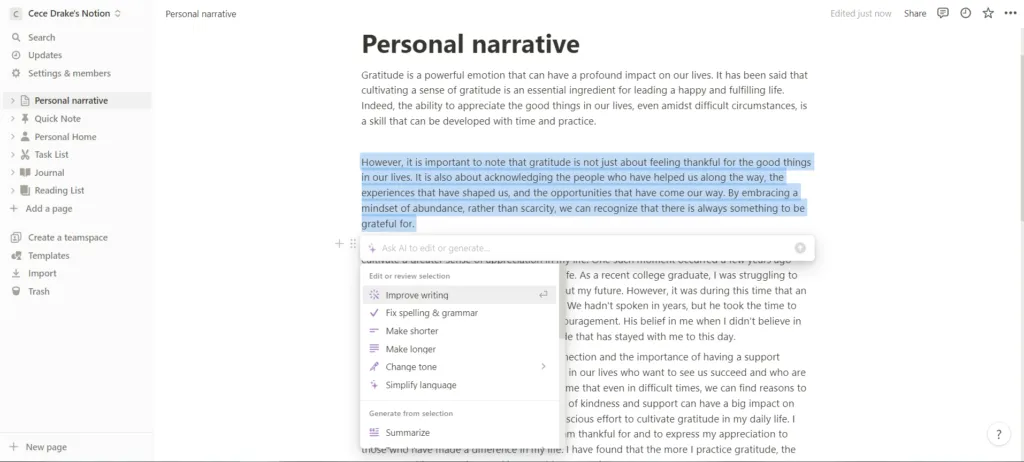
- Autofill databases — automatically extract structured data from text
- Page summaries — summarize long documents in seconds
- Q&A on your workspace — ask questions, get answers from your own content
- Writing assistance — draft, edit, translate, tone-adjust any text
- Action items extraction — pull tasks from meeting notes automatically
My honest take: Notion AI earns its $8/month if you write frequently in Notion, manage meeting notes, or maintain a large knowledge base. For casual users who open Notion once a week, however, it’s probably not worth the extra cost. Furthermore, students on the free plan get limited free AI responses — enough to test but not to rely on.
Notion Mail Review — Can It Replace Your Email?
Notion Mail is in early stages in 2026 — it syncs with Gmail and organizes emails alongside your Notion workspace. It’s promising but not ready to replace a dedicated email client for serious business use.
The notion mail review (also searched as notion email review) requires honesty: Notion Mail is still a beta-stage feature in 2026. It connects your Gmail account and surfaces emails directly in Notion — the promise being that you can link emails to projects, pages, and databases without switching apps.
However, the reality is that Notion Mail currently lacks features most business users consider standard — robust search, labels management, and multi-account support are limited. Consequently, it works well as a lightweight inbox companion but shouldn’t replace Gmail, Outlook, or any dedicated email client yet.
- Gmail sync — see emails alongside relevant Notion pages
- Link emails to Notion pages and projects automatically
- Available on free plan — no upgrade required
- Currently Gmail only — no Outlook support in 2026
- Missing advanced email management features
- Not ready for primary email client replacement
Think of Notion Mail as a way to reference emails in your workspace — not as your new inbox. Furthermore, if you’re already using Google Workspace, the Gmail integration is a nice convenience rather than a game-changer. Check back in 12 months — this feature has potential.
Notion Calendar Review — How Good Is It?
Notion Calendar is a clean, standalone calendar app that syncs with Google Calendar and your Notion databases. It’s genuinely useful for scheduling — but it’s not a full Google Calendar replacement for complex scheduling needs.
The notion calendar review is more positive than the Mail review. Notion Calendar is a separate app (available on web, Mac, iOS) that displays your Google Calendar events alongside Notion database entries. Additionally, it shows your meetings with relevant Notion pages linked — so you can jump from a calendar event directly to the meeting agenda in Notion.
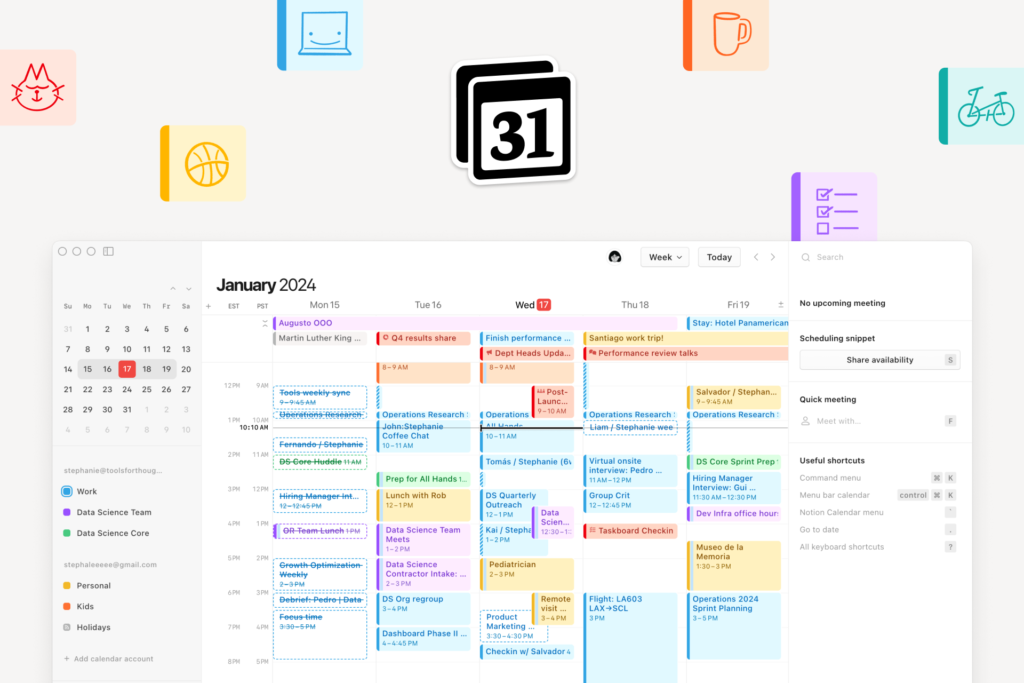
However, Notion Calendar currently only connects to Google Calendar. Therefore, Outlook and Apple Calendar users are left out. Furthermore, complex scheduling features like booking pages, team availability views, and multi-calendar management are limited compared to dedicated calendar tools.
- Google Calendar sync — events appear alongside Notion database items
- Link calendar events to Notion pages, tasks, and notes
- Included free — no extra cost on any Notion plan
- Clean, fast interface — genuinely pleasant to use daily
- Google Calendar only — no Outlook or Apple Calendar
- No booking/scheduling page feature
In my experience: Notion Calendar is the feature I use most from Notion’s new additions. Seeing my meetings and Notion tasks in one calendar view genuinely reduces context-switching. Consequently, if you use Google Calendar, it’s worth setting up even if you don’t use the rest of Notion heavily
Notion Review for Personal Use — Is It Right for You?
Notion is one of the best personal productivity apps available — especially at zero cost. For journaling, personal wikis, habit tracking, and note-taking, the free plan covers everything most individuals need.
The notion review for personal use comes down to one question: are you willing to spend 2-3 hours setting up your system? If yes, Notion’s free plan gives you an unlimited personal workspace that outperforms Evernote, Notion’s paid tier equivalent, and most note apps that charge monthly fees.
Furthermore, the template library makes starting easier — thousands of community templates cover personal dashboards, habit trackers, reading lists, travel planners, and more. Consequently, you don’t need to build from scratch. You can import a template, customize it to your needs, and start using it the same day.
- Personal journal and daily notes — unlimited pages, offline access on mobile
- Reading list and book tracker — database with custom fields
- Life wiki — capture everything you want to remember in one place
- Habit tracker — simple database with checkboxes and date properties
- Travel planning — itineraries, packing lists, booking references
Personal use verdict: If you currently pay for Evernote ($14.99/month) or Bear ($29.99/year) for note-taking, switching to Notion Free saves you money immediately — with more flexibility and features. Additionally, the mobile app is solid on both iOS and Android. I’d recommend Notion to anyone who wants to consolidate their personal notes and docs in one place.
Notion Review for Students — Worth Learning?
Notion is excellent for students. The free plan covers all study needs — lecture notes, essay drafts, reading trackers, and assignment databases. Notion AI adds value for research and summarization. Well worth learning.
The notion review for students is one of the most positive sections of this post. Notion’s free plan includes unlimited pages and blocks for solo use — meaning you can store every lecture note, essay draft, and research finding without ever hitting a limit. Furthermore, the 5MB file upload cap is the only real constraint, and for text-heavy academic work it rarely becomes a blocker.
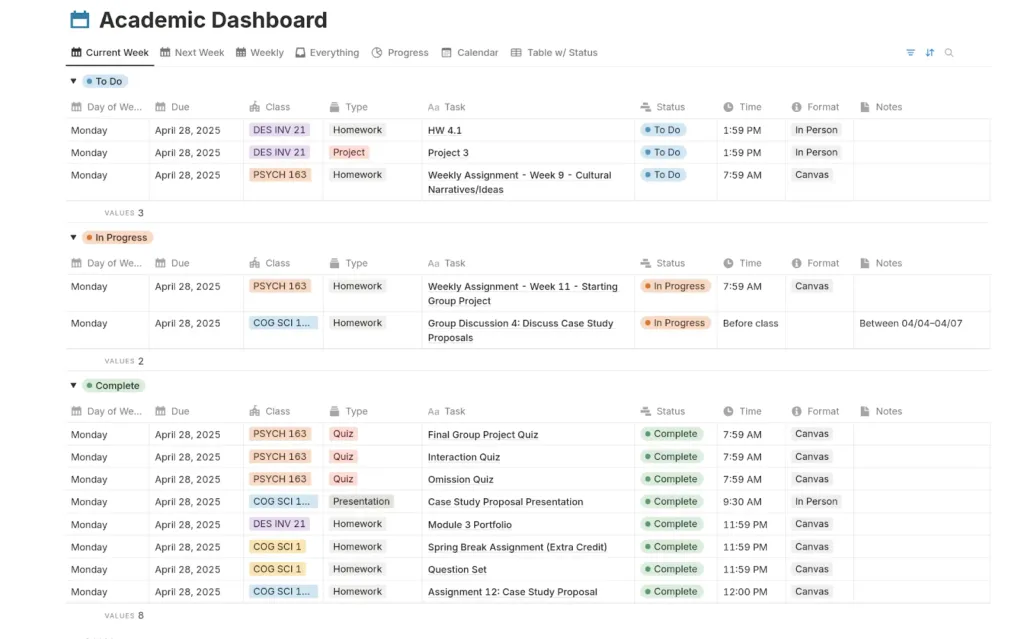
Additionally, the linked database system is particularly powerful for students. You can connect your reading list to your essay drafts, link lecture notes to assignment deadlines, and track academic progress in one place. Consequently, many students use Notion to replace Google Docs, Evernote, a planner, and a to-do app simultaneously.
- Lecture notes — organized by subject, date, and topic with linked databases
- Essay planning — outlines, drafts, research notes all in one page
- Assignment tracker — database with due dates, status, and subject tags
- Reading list — track books and papers with ratings and summaries
- Study flashcards — simple toggle blocks work surprisingly well for review
Student tip: Use Notion AI for research summarization. Upload your reading notes and ask Notion AI to identify key themes, create outlines, or pull specific quotes. Furthermore, the free trial AI responses are enough to test this without paying. Many students find AI alone justifies upgrading to Plus for the semester.
Notion Pros and Cons — Honest Verdict
Notion’s greatest strength is flexibility. Its greatest weakness is that flexibility — it takes time to set up, and teams without a dedicated ‘Notion admin’ often end up with a disorganized workspace.
| PROS | CONS |
| Free plan genuinely excellent — unlimited pages for solo use | Steep learning curve — takes 2 weeks to set up properly |
| Most flexible workspace available — build any system you need | Notion AI costs extra — $8/month add-on on top of plan price |
| Notion AI (add-on) uses GPT-4.1 + Claude — top-tier AI quality | Notion Mail still early stage — not ready as primary email client |
| Notion Calendar included free — Google Calendar sync | Notion Calendar: Google Calendar only — no Outlook support |
| Thousands of free community templates — fast starting point | Free plan team collaboration limited — block limits apply |
| Works for everything: notes, wiki, PM, CRM lite, content calendar | Not ideal as a dedicated task manager — use ClickUp or Asana for that |
| Great mobile app — iOS and Android both solid | Offline mode limited — desktop app needed for reliable offline access |
| No limits on page count or database rows on any paid plan | Can become disorganized fast without maintaining structure regularly |
Notion Review Reddit — What Real Users Say
Reddit users consistently praise Notion’s free plan and flexibility. The most common complaints: learning curve, Notion AI pricing, and Notion becoming ‘too complex’ without a clear structure.
Looking at notion review reddit threads across r/Notion, r/productivity, and r/students, the pattern is consistent. Furthermore, free plan users are overwhelmingly positive — many report using Notion for years without ever needing to pay.
However, the most common Reddit frustration is structural drift — Notion workspaces becoming unusable over time because nobody maintains the organization. Consequently, the most upvoted Notion advice on Reddit is always some variation of: ‘set up a clear structure from day one, or you’ll regret it in 6 months.’
The recurring themes we saw in these discussions (paraphrased, not direct quotes):
- Students on r/Notion often say the free plan covers everything they need.
- A common view on r/productivity: Notion AI is good, but hard to justify as an extra cost on top of the Plus plan.
- Many former Evernote users say free Notion replaced paid Evernote for them.
- Notion Mail is seen as promising, but not yet ready for serious email management.
- A popular tip on r/students: set up your structure in the first week, or your workspace turns into a junk drawer.
Final Verdict — Our Notion Review Rating
| Category | Rating | Score |
| Free Plan Value | ★★★★★ Unlimited pages — best free note app | 4.8 / 5 |
| Ease of Use | ★★★★☆ Learning curve but worth it | 4.0 / 5 |
| Flexibility | ★★★★★ Most customizable workspace | 5.0 / 5 |
| Notion AI | ★★★★☆ Powerful but costs extra ($8/mo add-on) | 4.2 / 5 |
| Notion Calendar | ★★★☆☆ Good but not full calendar replacement | 3.5 / 5 |
| Notion Mail | ★★★☆☆ Early stage — promising but incomplete | 3.2 / 5 |
| Pricing Fairness | ★★★★☆ Free is great, paid is reasonable | 4.3 / 5 |
| OVERALL | ★★★★☆ Highly Recommended | 4.3 / 5 |
After 18 months of daily Notion Use
my conclusion is clear: Notion is the most versatile workspace app available in 2026. Furthermore, the free plan is genuinely excellent for students, freelancers, and personal users — no other note app at zero cost comes close.
However, be realistic about Notion AI and the new features. While Notion Mail looks promising, it’s still not ready for primary use. If you already rely on Google Calendar, the new Notion Calendar is surprisingly solid. As for Notion AI, the $8/month add-on only makes sense for heavy daily users.
Therefore My Recommendation
start with Notion Free today. Spend one afternoon building your workspace using a template. After 30 days of real use, you’ll know exactly which paid features — if any — are worth adding. Consequently, you’ll never regret starting — only regret not starting sooner.
| Final Notion Review Rating: 4.3 / 5 Best plan: Notion Free — unlimited for solo use, zero cost Best upgrade: Plus ($8/user/mo annual) when your team needs collaboration Notion AI: Worth $8/mo add-on for heavy daily users only Notion Calendar: Set it up free — genuinely useful Notion Mail: Wait 12 months before making it your primary email Start free at notion.com — no credit card required |
| Was This Notion Review Helpful? Drop a comment below — are you using Notion for personal use, studying, or your business? Share your experience!Share this review with a student or colleague considering Notion. It might save them hours of research! |
Using Notion as part of a remote work setup? Our guide to the best tools for remote teams in 2026 covers how Notion pairs with Slack, ClickUp, Loom, and other remote collaboration tools.
Wondering if Notion can replace a dedicated project management tool? For a complete side-by-side comparison, see our guide to the best project management tools for small businesses in 2026. better fit.